Therapist websites
GDPR Compliant Website for Therapists: A UK Checklist
What actually makes a therapist website GDPR compliant: cookies, your enquiry form, third-party tools and where your data ends up being stored.
On this page9 sections
A therapist website usually gets GDPR attention for the wrong reason: whether the practice is compliant, meaning client notes, retention periods and ICO registration. Our guide to GDPR for therapists covers all of that. But having a genuinely GDPR compliant website is a separate job, because the site itself, before a single client record even exists, is doing its own data processing the moment someone lands on it: cookies fire, a contact form collects an enquiry, a booking widget or chat tool loads from someone else's server. That's where a lot of otherwise careful practices quietly fall short.
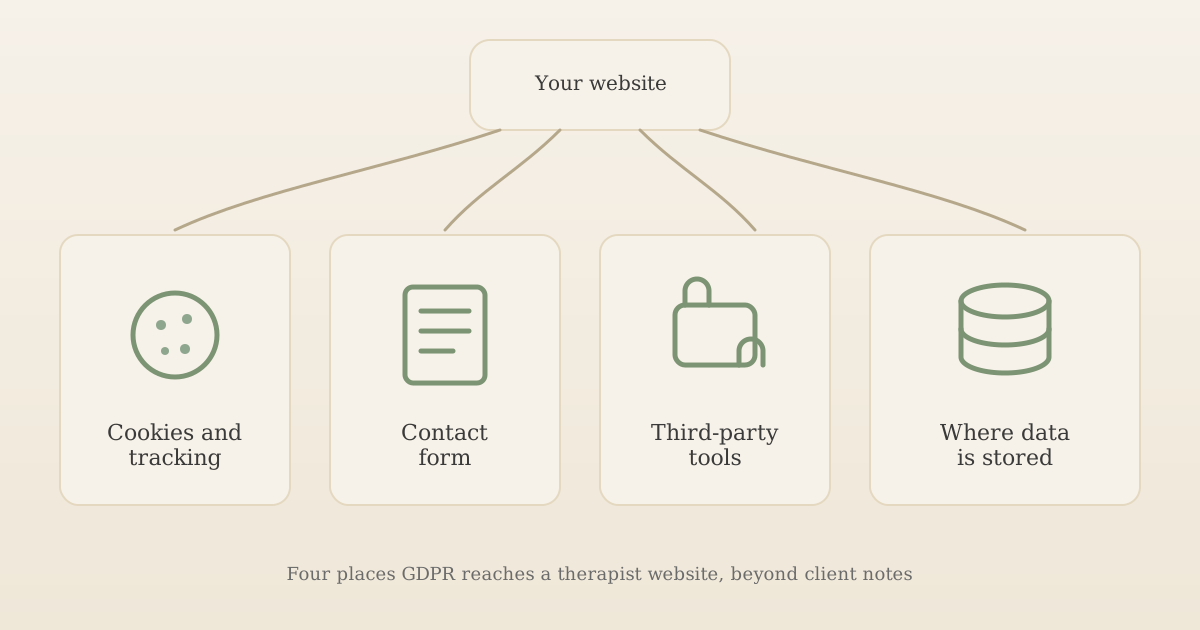
This guide walks through the four places GDPR actually reaches a UK therapist website, in plain terms, so you can check your own site rather than rely on a generic small-business checklist that doesn't account for what makes a therapy enquiry different.
Key takeaways:
- Your website triggers its own GDPR and PECR obligations, separate from how you handle client session notes.
- Advertising pixels, chat widgets and most third-party embeds need consent before they load, not just a mention in a privacy policy. Simple analytics can now run without consent if it meets the ICO's conditions, including telling visitors and giving them an easy way to opt out.
- A consent checkbox isn't automatically required on a simple enquiry form, but a message field that invites someone to describe their situation needs extra care.
- Where your website's tools actually store data matters. Many mainstream tools are covered for international transfers, but it isn't automatic.
Important: This is a practical overview, not legal, tax, regulatory or professional advice. Data protection law applies to your specific circumstances, and this article can't account for every variation. Check current ICO guidance and get independent advice if you're unsure.
Why your website has its own GDPR obligations
It's easy to think of GDPR as something that starts once a client has actually booked in, but your website is processing personal data from the first visit. A cookie that logs a visitor's device, an enquiry form that captures a name and a private message, an embedded booking calendar that talks to a third party's servers: each of these is a data processing activity you're responsible for, regardless of whether you built the tool yourself or dropped in a plugin.
None of this needs to be complicated. It needs to be deliberate: know what your site actually does, check the handful of things below, and fix what's missing.
Cookies and other tracking on your website
Cookies and similar tracking technologies (pixels, local storage used for tracking) are governed by the Privacy and Electronic Communications Regulations (PECR), not just GDPR itself. The ICO's guidance on storage and access technologies is clear that, as a rule, anything that isn't strictly necessary needs a visitor's consent before it's set, not retrospective disclosure in a privacy policy. That covers marketing and advertising pixels, chat widgets and most embedded tools.
In practice, that means:
- Nothing that needs consent loads before consent. A Meta pixel, an advertising tag or a third-party chat widget shouldn't fire the moment your page loads, only after a visitor accepts. The same goes for Google Analytics, unless you've checked it meets the analytics exception below.
- Accepting and declining need to be equally easy. A banner with a prominent "Accept" button next to a buried "Manage preferences" link isn't a genuine choice in the ICO's own terms.
- A cookie policy needs to actually list what you use, not just say "we use cookies to improve your experience."
Most website builders and CMS platforms offer a consent banner plugin; the mistake worth checking for is one that's installed but not actually blocking scripts until consent is given, which is common and defeats the point. If you run Google or Facebook ads, the conversion tag or pixel falls squarely in this category; our guide to paid advertising for therapists covers how to set ad tracking up without sending health information to the platforms.
Analytics without consent: the new exception
Analytics used to sit in the same "needs consent" bucket. Since the Data (Use and Access) Act 2025, PECR has a statistical purposes exception, and the ICO's guidance (finalised in April 2026) explains when it applies. You can run analytics without asking for consent first, but only if all of these are true:
- It's only about how your site is used, not who uses it: page visits, time on page, devices, where visitors came from, in aggregate. The ICO says it is "not for identifying, tracking or monitoring people".
- The results are used only to improve your own website.
- Any analytics provider acts as your processor (on your behalf only), not as a joint controller, and doesn't combine the data with anything else it holds.
- You tell visitors what you use and why, and give them a simple, free way to object.
- Nothing advertising-related is involved. Measuring ads, sharing conversions with ad platforms and remarketing all still need consent; the ICO says online advertising purposes "never have been" exempt.
A privacy-focused analytics tool that counts visits without identifying anyone may fit this, if it's set up to meet every condition above. "Cookieless" doesn't settle the question on its own, though. PECR covers any technology that stores or reads information on a visitor's device, and the ICO's guidance on what counts as a storage and access technology says the rules apply whenever scripts and tags access or store information on a device. So a cookieless tool that runs a script in the visitor's browser will usually still need consent or the exception above. Analytics built only from your own server's logs, with nothing running on the visitor's device, falls outside PECR altogether, but those logs usually include IP addresses, so UK GDPR still applies and the tool belongs in your privacy notice. Whether Google Analytics fits depends on how it's set up, for example whether Google signals, advertising features or data sharing with Google are switched on. Unless you've checked, keep it behind your consent banner. On a therapy website, also think about what your page addresses reveal: a page called "/anxiety-counselling" tells an analytics provider something about why someone visited.
Your contact and enquiry form
This is the part of a therapist website that most generic GDPR advice gets wrong, because it treats every enquiry form the same way.
For an ordinary "get in touch" form, the ICO's own guidance on legitimate interests confirms that most businesses can rely on legitimate interests as their lawful basis, not consent, since you're responding to someone who contacted you first. You don't need a mandatory tick-box just to receive an enquiry. What you do still need, under the right to be informed, is a clear, easy-to-find privacy notice explaining what happens to the information once it's submitted.
Two situations change this:
- If the same form also signs someone up to marketing emails or a newsletter, PECR requires consent for that specific purpose, separately from however you justify holding the enquiry itself.
- If your form's free-text message field could reasonably capture special category data. A general "how can we help?" box invites exactly that: a visitor might describe anxiety, a bereavement, or a diagnosis before you've had a single conversation with them. Health data is special category data, so processing it needs both an ordinary lawful basis and a separate Article 9 condition, almost always explicit consent. A short line near the message field, making clear what will happen to anything they choose to share, does the practical work here.
Third-party tools and embeds
A booking widget, a video call embed, a live chat bubble, a payment processor: each of these is a separate business you've invited onto your site, and each one makes its own data-handling decisions the moment it loads.
For each third-party tool on your site, it's worth confirming:
- What it collects. A chat widget might log a visitor's IP address and browsing history across your site, not just the messages they type.
- Whether it sets cookies before consent. Embedded YouTube video is a common culprit: the standard embed can set cookies on load, whereas most platforms offer a "privacy-enhanced" or consent-gated embed mode that doesn't.
- Where it's named. Your privacy policy should list the actual tools you use, not a generic category like "third-party services."
This overlaps with the wider question of what your website should include in the first place; see our guide to what a therapist website should include if you're still deciding which tools and pages to build in.
Where does your website's data actually go?
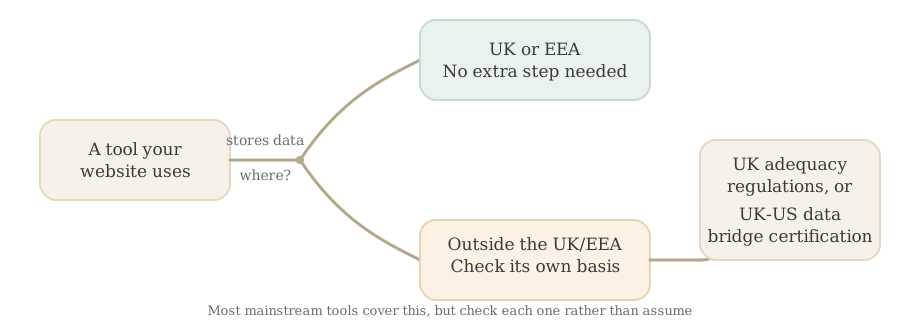
Most UK therapists don't think about where their booking system, email provider or hosting actually stores data, and most of the time it doesn't matter. It starts to matter when a tool stores or processes data outside the UK, which UK GDPR treats as a "restricted transfer" requiring its own legal basis.
The ICO's January 2026 guidance, updated following the Data (Use and Access) Act 2025, sets out how to check this. In short, a transfer outside the UK is generally fine if the receiving country has UK adequacy regulations, or if the specific provider is self-certified under the UK Extension to the EU-US Data Privacy Framework, often called the UK-US data bridge. Many mainstream US-based tools, from email marketing platforms to video conferencing, are certified under this. The mistake is assuming a well-known brand automatically qualifies rather than checking that specific tool's own privacy or trust page.
Your privacy policy: what it needs to actually say
A privacy policy isn't a formality to publish once and forget. For a UK therapist website, it should:
- Name the actual tools you use (booking system, email provider, analytics, hosting), not generic categories.
- State your lawful basis for the enquiry form, and separately for any marketing sign-up.
- Acknowledge that session-related data, once someone becomes a client, is special category health data, and link through to fuller detail if you keep a separate client-facing privacy notice.
- Include the complaints route direct to you, a duty introduced by the Data (Use and Access) Act 2025, alongside the existing right to complain to the ICO.
Our fuller guide to GDPR for therapists covers the practice-wide version of this, including ICO registration and retention periods; this section is specifically about what your website's privacy policy needs to cover, which is narrower but still easy to leave generic.
Is your website GDPR compliant? A quick self-audit
| Check | What "compliant" looks like |
|---|---|
| Cookies | Nothing that needs consent loads before consent; accept and decline are equally easy; any consent-free analytics meets the ICO's conditions and visitors can opt out |
| Contact form | A visible privacy notice; consent only where PECR or special category data genuinely requires it |
| Message field | A short line about what happens to anything sensitive a visitor chooses to share |
| Third-party embeds | Each one named in your privacy policy; non-essential ones gated behind cookie consent |
| Data location | You know, tool by tool, where data is actually stored and whether a transfer check applies |
| Privacy policy | Names your actual tools, not generic categories; includes the direct-complaint route |
If your website was built on a platform with reasonable defaults, some of this may already be handled; our comparison of website builders against a custom or done-for-you website is worth reading if you're still choosing a platform, since how much of this is done for you varies a lot between them.
Frequently asked questions
Do I need a consent checkbox on my therapist website's contact form?
Not automatically. For a simple 'get in touch' enquiry, most UK businesses rely on legitimate interests rather than consent as the lawful basis, since you're responding to someone who contacted you first. The exception is PECR: if the same form signs someone up to a newsletter or marketing emails, consent becomes mandatory for that specific purpose regardless. There's also a therapy-specific wrinkle a generic small-business guide won't mention: if your message field could reasonably capture special category data, for example someone describing a mental health condition before you've even spoken, you need an Article 9 condition too, most commonly explicit consent, not just an Article 6 lawful basis.
Does embedding Calendly, Zoom or a booking widget on my website affect GDPR compliance?
Yes. Any third-party tool that loads on your site, whether that's a booking calendar, live chat widget or embedded video, can set cookies or send data to that provider's own servers, and that counts as your processing decision even though you didn't build the tool. Check each tool's own privacy and data processing terms, name it in your privacy policy, and where it sets non-essential cookies, which most embedded video and many chat widgets do, gate it behind the same cookie consent as your analytics rather than letting it load automatically.
Is a free privacy policy generator enough for a therapist website?
It's a reasonable starting point but rarely enough on its own. A generic template usually won't name the specific tools you actually use (your booking system, email provider, analytics, hosting), won't reflect that therapy notes are special category health data, and won't mention the newer duty to let clients complain to you directly, introduced by the Data (Use and Access) Act 2025. Use a generator for the first draft, then edit it so it actually matches your setup rather than publishing it unedited.
Does my website's data need to stay in the UK?
No, but if a tool you use stores or processes data outside the UK, that's a 'restricted transfer' under UK GDPR and needs its own legal basis, most commonly that the receiving country has UK adequacy regulations, or the provider is self-certified under the UK Extension to the EU-US Data Privacy Framework (sometimes called the UK-US data bridge). Many mainstream US-based tools are certified, but it isn't automatic just because a brand is well known. Check the specific tool's own privacy or trust page rather than assuming.
Start with what's actually loading on your site
The fastest way to make progress is to open your own website in a private browser window and watch what loads before you click anything. If an advertising pixel, a chat widget, or analytics you haven't checked against the exception fires immediately, that's your first fix. Then work through the contact form, your embedded tools, and finally your privacy policy's wording, in that order, since each one builds on the last.
This is one part of a wider practical setup; if you haven't yet worked through the basics of starting a UK private practice, our guide to setting up a private therapy practice covers the foundations alongside this.
A website that's GDPR compliant from the start
UpTopWeb builds calm, professional websites for counsellors and therapists with consent-gated cookies, a properly scoped contact form and clear third-party disclosures already built in.
Further reading
Related articles
Therapist websites10 minute read
Therapist Website Security: What PHP2Shell Means for You
Therapist websites16 minute read
Therapist Service Pages: Does Each Specialism Need Its Own Page?
Therapist websites13 minute read
Squarespace vs Wix for Therapists: A Fair UK Comparison