Therapist websites
Therapist Website Security: What PHP2Shell Means for You
A serious flaw in PHP, the software behind WordPress, was fixed on 21 October 2026. What it means for a therapist website, who has to act, and what to ask your host.
On this page10 sections
On 21 October 2026, the PHP project released fixes for two critical flaws, nicknamed PHP2Shell, that could let an attacker run their own code on a web server without logging in. PHP is the software that runs WordPress, so a lot of therapist websites sit on top of it. This guide explains, in plain English, what therapist website security means in light of PHP2Shell: whether your site is affected, who is responsible for fixing it, and what to ask.
It's written for UK counsellors and therapists, not developers, and reflects what was published up to 2 November 2026.
Key takeaways:
- PHP2Shell is a flaw in PHP itself, not in WordPress, themes or plugins. Updating WordPress won't fix it; the server's PHP has to be updated.
- The fixed versions are PHP 8.5.12, 8.4.27, 8.3.36 and 8.2.35. PHP 8.1 and older no longer get fixes from the PHP project.
- Squarespace and Wix sites don't give you a server to update. If someone else hosts your WordPress site, it's their job, but it's worth asking them to confirm.
- If your enquiry form collects client details, a hacked site can become a personal data breach, which brings UK GDPR duties.
Important: This is a practical overview, not legal, data protection or technical security advice. If you think your website has been compromised, speak to whoever hosts it straight away, and take advice on your data protection duties.
What happened, in plain English
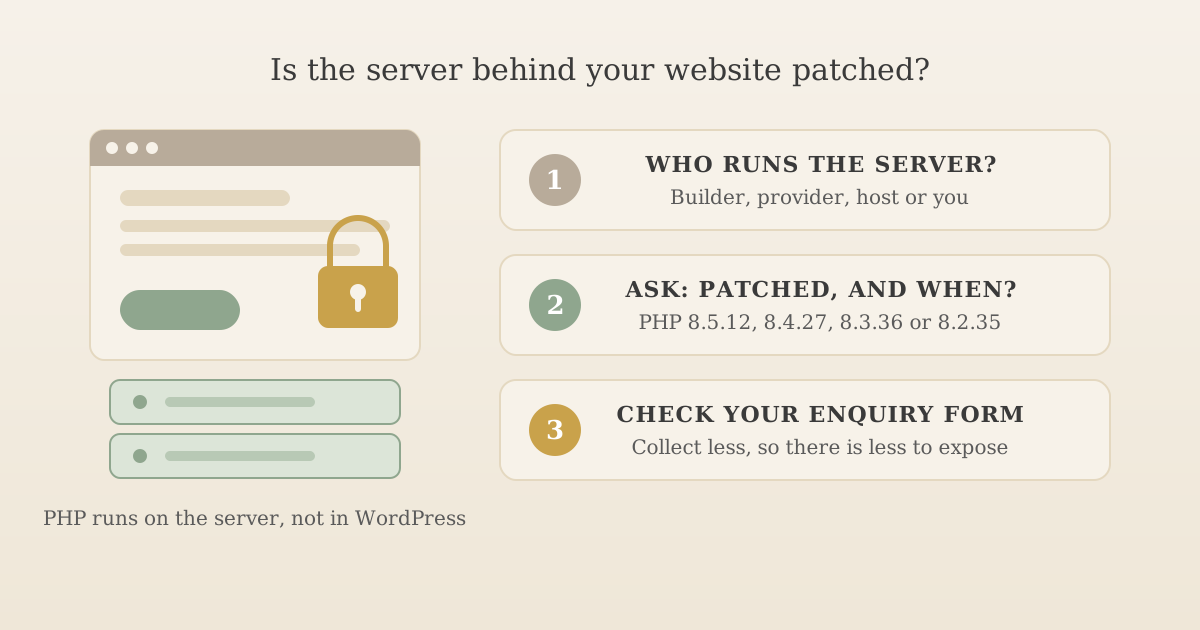
PHP is a programming language that runs on the web server behind a large share of websites. When someone visits a WordPress page, PHP is what builds that page on the server before it reaches their browser.
The PHP project's security advisory of 21 October 2026 describes two vulnerabilities (CVE-2026-109618 and CVE-2026-109619) that can allow "unauthenticated remote code execution". In everyday terms: someone on the internet, with no password, could make the server run commands of their choosing. On 26 October, the US Cybersecurity and Infrastructure Security Agency added both to its Known Exploited Vulnerabilities catalogue, the list it keeps of flaws with evidence of being used in real attacks.
Three details matter for a therapist:
- It's a server problem, not a WordPress problem. Your theme, plugins and WordPress version don't cause it and updating them doesn't cure it.
- The fix is a PHP update. The PHP project lists PHP 8.5.12, 8.4.27, 8.3.36 and 8.2.35 as fixed. Linux distributions received the patches in advance, so many hosts apply them through their own packages.
- Old PHP is a bigger worry. The PHP project's supported versions page shows that 8.1 and everything older is past end of life, so it gets no fix from the PHP project. Some vendors provide backported fixes, but a site still running PHP 7 or 8.0 is a sign nobody has been looking after the server for a while.
Do you need to do anything? It depends who runs your server
The useful question isn't "is my website secure?" but "who looks after the server it runs on?" For most therapists, the answer is someone else.
| Your setup | Does it run on PHP? | Who updates PHP? | What to do |
|---|---|---|---|
| Hosted builder (Squarespace, Wix and similar) | You don't have a server to manage | The platform | Nothing to update yourself. Keep your account login secure |
| WordPress built and hosted by a web designer or website provider | Yes | Your designer or provider | Ask them to confirm, in writing, that the server is patched |
| WordPress on a shared hosting account in your name | Yes | Usually the host, sometimes you | Check your PHP version (below) and ask the host |
| WordPress on a server you or a contractor manage yourselves | Yes | You or your contractor | Update PHP now, or get your contractor to |
If you're not sure whether your site is WordPress, ask whoever built it. A quick clue: if adding /wp-admin to the end of your website address brings up a WordPress login page, it's WordPress.
If your site is one of many on a shared platform
Some therapist website providers run hundreds or thousands of client sites on one shared WordPress installation. That works both ways. When the provider updates PHP once, every site on the platform is fixed together. If the provider is slow, every site is exposed together, and you can't update it yourself because you don't have access to the server. Either way, the only person who can give you a real answer is the provider, so ask.
How to check your PHP version in WordPress
If you can log in to your WordPress dashboard as an administrator, go to Tools, then Site Health, then the Info tab, and open the Server section. WordPress's own Site Health documentation describes the same screen. You'll see a PHP version listed there.
Read it with two cautions:
- A lower number doesn't always mean unpatched. Some Linux distributions apply security fixes to their own PHP packages without changing the main version number. That's normal and fine, but it means only the host can tell you for certain.
- A matching number is good news, not the whole story. It tells you this flaw is fixed. It doesn't tell you whether your plugins are current, whether backups exist, or whether anything was changed on the site before the fix went on.
Why online "PHP2Shell checkers" can't really tell you
A few websites now offer a free checker: you type in your address and it tells you whether you're at risk. Most of them load your homepage and read the PHP version your server announces about itself. That has two problems. Many hosts and security services hide that version, so the checker can only say "unknown". And because of the backported fixes above, a version number alone can't prove a server is patched or unpatched.
A checker can be a prompt to ask the question, but it isn't the answer. The answer comes from whoever runs the server.
PHP2Shell is unusual: plugins are the everyday risk
A flaw in PHP itself is rare. The far more common problem on a WordPress site is a plugin or theme that hasn't been updated. Patchstack, a WordPress security company, found 11,334 new vulnerabilities in the WordPress ecosystem in 2025, a 42% rise on 2024. Its report puts 91% of them in plugins and 9% in themes, with only six in WordPress itself, all low priority. It also found that about half of high-impact vulnerabilities were exploited within 24 hours, and that 46% had no fix from the developer by the time they were made public.
None of that makes WordPress a bad choice. A WordPress site that someone keeps on top of can be perfectly safe. It does mean every plugin is one more thing that needs updating, promptly, for as long as the site exists. Two practical steps:
- Remove plugins you don't use. In some cases a deactivated plugin can still be a risk while its files are on the server; deleting it removes them.
- Find out who updates the rest, and how quickly. If that's you, turn on automatic updates where you can and check the dashboard weekly. If it's your designer or provider, ask (it's the fifth question below).
What to ask your web host or provider
Here's a short message you can send. Edit it to suit; nothing in it needs technical knowledge.
Hello, I've read about the PHP2Shell vulnerabilities (CVE-2026-109618 and CVE-2026-109619) fixed on 21 October 2026. Could you confirm:
- Which PHP version my website runs on, and whether the server has the fix (PHP 8.5.12, 8.4.27, 8.3.36 or 8.2.35, or your own patched package)?
- When the fix was applied?
- Whether you've checked for any signs my site was accessed or changed before then?
- When my most recent backup was taken, and where it's kept?
- How quickly you apply WordPress, plugin and theme updates?
Thank you.
A good provider will answer all five plainly. If the reply is vague, or they can't tell you which PHP version you're on, treat that as useful information about how your site is being looked after. Our guide to website maintenance for therapists covers what reasonable ongoing care looks like and what it usually costs.
Why therapist website security matters more than a café's
For most small businesses, a hacked website is an embarrassment and a nuisance. For a therapist it can also be a data protection issue, because of what passes through the site.
- Enquiry forms. People often say more than you'd like in a first message: what they're struggling with, sometimes their full name and phone number. Some WordPress form plugins keep a copy of every enquiry in the website's database as well as emailing it to you.
- Booking and payment tools. If these are embedded in or connected to your site, check with each supplier where the data is held.
- Your reputation as a safe place. A site that redirects visitors to spam, or shows a browser warning, undermines the very trust it exists to build.
The ICO's guide to personal data breaches sets out the rule: if a breach is likely to result in a risk to people's rights and freedoms, you report it to the ICO within 72 hours of becoming aware of it, and tell the people affected without undue delay if the risk is high. Not every hacked website meets that bar, but you should record the incident either way. Our guide to GDPR for therapists covers breach handling and record-keeping in more detail.
The simplest protection is collecting less. The GDPR checklist for therapist websites explains how to keep an enquiry form minimal (name, a way to reply, a short message) and to tell people not to include clinical detail. Then, if the worst happens, there's very little to expose.
If you think your site has already been hacked
Signs include pages you didn't write, visitors being sent to other websites, a browser or Google warning when you visit, new administrator accounts you don't recognise, or your host telling you they've found malicious files.
- Contact your host or provider straight away and ask them to investigate and restore from a clean backup if needed.
- Change your passwords for the website, hosting account and the email address linked to them.
- Write down what you know: when you noticed, what you saw, and what data the site holds or collects.
- Decide whether it's a reportable breach, using the ICO guidance above, and take advice if you're unsure.
- Ask what changes so it doesn't happen again: supported PHP, updated plugins, regular off-site backups.
The National Cyber Security Centre's small business guide is a good, non-technical place to start on backups, passwords and phishing more generally.
Frequently asked questions
Is my therapist website affected by PHP2Shell?
Only if it runs on PHP, which includes every WordPress site, and the server hasn't been updated to PHP 8.5.12, 8.4.27, 8.3.36 or 8.2.35 (or a vendor's patched package). Sites on hosted builders such as Squarespace and Wix don't give you a server to manage, so there's nothing for you to update there. If someone else built or hosts your WordPress site, ask them.
Will updating WordPress or my plugins fix PHP2Shell?
No. The flaw is in PHP, the server software WordPress runs on, not in WordPress itself, its themes or its plugins. Whoever manages the server has to update PHP. Keeping WordPress and plugins updated still matters for other reasons, but it doesn't fix this.
Can an online checker tell me if my site is patched?
Not reliably. Most checkers read the PHP version a website reports about itself, and many hosts hide that, so the result is often 'unknown'. Some Linux distributions also apply the fix without changing the main version number, so an older-looking number can still be patched. Asking your host directly is the dependable route.
Do I have to report it to the ICO if my website is hacked?
Only if personal data is affected and the breach is likely to result in a risk to people's rights and freedoms. Then the ICO's guidance says to report it within 72 hours of becoming aware of it, and to tell the people affected without undue delay if the risk is high. Record the incident internally either way, and take advice if you're unsure.
The question to ask today
You don't need to understand memory corruption or server configuration to deal with PHP2Shell. You need to know who runs the server your website lives on, and to ask them one clear question: "Is it patched, and when?" If you can't easily find out who that is, that's worth fixing too, because the next security issue will need the same answer.
A therapist website with the technical side handled
UpTopWeb sites don't run on PHP, so there's no PHP server for you to patch. We design and build your therapist website, with hosting, security and unlimited edits in one monthly fee.
Further reading
Related articles
Therapist websites8 minute read
Website Maintenance for Therapists: What It Actually Costs
Therapist websites11 minute read
GDPR Compliant Website for Therapists: A UK Checklist
Starting a practice13 minute read
GDPR for Therapists: A Guide to Client Records and Data Protection