Starting a practice
Secure Email for Therapists: Options and Tools Compared (UK)
Is Gmail or Outlook secure enough for client email? What UK GDPR expects, which messages need encrypting, and Microsoft 365, Google, Proton and Tuta compared.
On this page11 sections
Secure email for therapists comes down to three questions: is a message protected on its way, is it protected while it sits in an inbox, and can anyone other than the recipient read it? Most everyday email already gets the first. Very little gets the third without you switching it on. This guide is for counsellors and psychotherapists in UK private practice. It covers what UK GDPR expects for client email, which messages need extra protection, how Microsoft 365, Google Workspace, Proton and Tuta handle encryption, and what to do when you need to send a report to a GP or a solicitor. Prices were checked on each provider's own pages on 5 November 2026.
Important: This is a practical overview, not legal, regulatory or professional advice. Check current ICO guidance and your professional body's position, and get independent advice if you're unsure what applies to your practice.
What "secure email" actually means
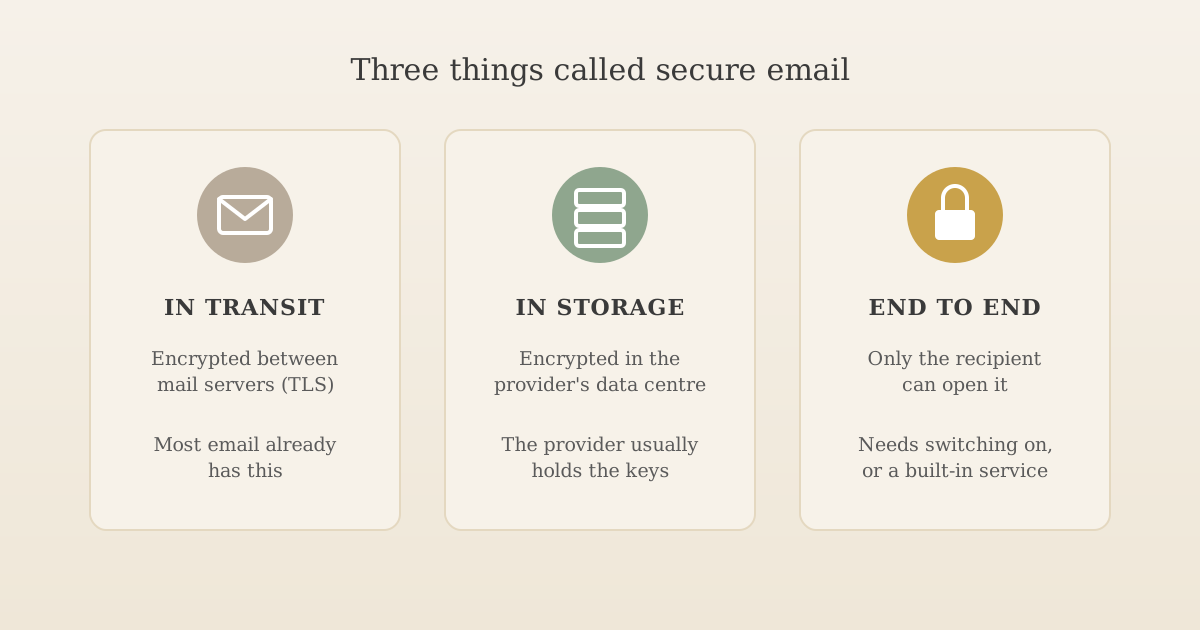
When a provider says its email is secure, it usually means one or more of these:
| Layer | What it protects against | Who usually has it |
|---|---|---|
| Encrypted in transit (TLS) | Someone reading a message as it travels between mail servers | Nearly everyone. Google says all Gmail messages use TLS, as long as the other side supports it |
| Encrypted at rest | Someone getting hold of the provider's stored data | Most large providers, but they hold the keys, so the provider itself can still read your mail |
| End-to-end (message-level) encryption | Anyone except the sender and the recipient reading the message, including the email providers | Only when you switch it on, or with providers such as Proton and Tuta that build it in |
TLS is the important baseline, but it has limits. It protects each hop between servers, not the message itself, and it only works if both servers support it. Gmail flags a message that arrived without it with a red open padlock. Once delivered, a TLS-protected email sits in the recipient's inbox as an ordinary readable message. That's why the ICO's guidance on encryption and data transfer points out that, without additional encryption, data is only encrypted while it's in transit.
What UK GDPR expects for client email
UK GDPR doesn't name a product or say every email must be encrypted. It asks you to protect personal data with security that fits the risk. Client email often includes health information, which is special category data, so the bar is higher than for an ordinary small business. Our guide to GDPR for therapists explains why therapy notes fall into that category.
The ICO's guidance gives three practical pointers:
- Encrypt what's sensitive, especially when it leaves your organisation. The ICO's encryption scenarios describe encrypted email as something to consider based on what you're sending, with encrypted attachments as an alternative. The key, it says, should reach the recipient by a separate channel, never in the same email.
- Wrong recipients are the everyday risk. In its page on email and security, the ICO says it has seen hundreds of breach reports where someone misused the BCC field. Encryption doesn't help if the message goes to the wrong person.
- Treat unencrypted email as readable. The same page compares unencrypted emails to postcards. That's a useful test: if you wouldn't write it on a postcard, add protection or send it another way.
The ICO's encryption scenarios also describe a council fined £120,000 after an unencrypted email containing special category data about 241 people went to the wrong recipient. A sole practitioner's risk is smaller in scale, but the same mistake with one client's report is still a personal data breach.
Which messages need what
Most of your email doesn't need special treatment. The aim is to match the protection to the message, and to keep clinical detail out of everyday email.
| Message | What it usually contains | Reasonable approach |
|---|---|---|
| Appointment times and changes | A date and time | Normal business email is usually fine. Leave out what the session is for |
| Reply to a new enquiry | Availability, fees, next steps | Normal business email. Don't ask the person to send their history by email |
| Invoices and receipts | Name, dates, amount | Normal business email, or your practice software's invoicing |
| Anything clinical: notes, risk, assessments | Health information | Message encryption, an encrypted attachment, or a secure portal. Not plain email |
| Reports to a GP, referrer or solicitor | Health information sent outside your practice | Encrypted, checked recipient, only what's been asked for. See below |
| A message to several people, such as a group | Email addresses that reveal who attends | Send individually, not by CC. BCC alone isn't enough for sensitive groups |
If you find yourself regularly sending clinical information by email, it may be a sign that a client portal or practice software would suit you better. Our guide to practice management software covers what those systems do.
Secure email for therapists: the options compared
These are the providers therapists most often ask about. The question that matters here isn't storage or calendars (our practice software guide compares the suites on those), but whether you can send an encrypted message to a client or GP who uses any email address.
Here's what we found on the providers' own pages on 5 November 2026:
| Provider | Encrypted email to anyone? | How the recipient opens it | Custom domain | Price checked |
|---|---|---|---|---|
| Gmail (free) or Outlook.com | No message encryption. TLS in transit only | Normally | No (personal addresses only) | Free |
| Microsoft 365 | Yes, with Purview Message Encryption, included in Business Premium, or an add-on for Basic and Standard | Signs in with Google or Microsoft, or gets a one-time passcode | Yes | Business Basic £5.40, Business Premium £24.60 per user a month, paid yearly, excluding VAT |
| Google Workspace | Not on Starter or Standard. S/MIME on Enterprise; client-side encryption on Enterprise Plus | S/MIME needs both sides set up | Yes | Starter £5.90, Standard £11.80 per user a month, excluding VAT |
| Proton Mail | Yes, password-protected emails, on every plan including free | Opens a link and enters a password you share separately; can reply securely | Paid plans | Mail Plus $3.99, Mail Essentials $6.99 a month billed yearly (shown in dollars, euros or Swiss francs, not pounds) |
| Tuta | Yes, with a shared password, on every plan including free | Opens a link and enters the password; can reply securely | Paid plans | Revolutionary €3 a month paid yearly including tax; business plans from €6 a user a month excluding tax |
Microsoft 365
If you already use Microsoft 365 for business, check which plan you're on before buying anything new. Microsoft's service description lists Purview Message Encryption in Business Premium, and says Basic and Standard can get it by adding Azure Information Protection Plan 1. Once it's on, you can encrypt a message from Outlook and a client on Gmail can still open it. Microsoft's guide for recipients shows the sign-in and one-time passcode options. A UK-set-up tenant also keeps your email stored in the UK, which our practice software guide covers.
Google Workspace
Google Workspace protects mail in transit and at rest, but its entry plans have no button for encrypting a message to anyone. S/MIME needs the recipient to have a certificate too, so it rarely works for clients. Gmail's confidential mode isn't a substitute: Google's confidential mode page describes expiry dates and blocking forwarding or downloading, not encryption, and notes that recipients can still take screenshots. On Workspace, the practical route for clinical content is an encrypted attachment or a portal.
Proton and Tuta
Both are built around encryption and are the simplest way for a sole practitioner to send an encrypted message to any address. Proton says its inbox uses zero-access encryption, which means Proton can't read stored messages, though subject lines aren't end-to-end encrypted. Tuta encrypts subject lines too, and says its data is stored on its own servers in Germany. Proton is a Swiss company.
Two things to plan for:
- The password has to travel separately. Phone or text it, or agree it in a session, in line with the ICO's advice. Never put it in the same email.
- Replies have limits. Proton's password-protected emails expire after 28 days by default, and a non-Proton recipient can reply up to five times. Long-running conversations work better through a portal.
Which apps each one works with
Encryption often costs some convenience. If you like reading email in one app on your phone, check this before you choose:
| Option | Its own apps | Apple Mail, Outlook or Thunderbird | Gmail app on your phone |
|---|---|---|---|
| Microsoft 365 | Outlook for iPhone, Android and desktop | Yes | Yes |
| Google Workspace | Gmail for iPhone, Android and the web | Yes, Google says these can access Gmail through IMAP | Yes |
| Proton | Proton Mail for iPhone, Android and desktop | Desktop only, through Proton Mail Bridge on a paid plan | No |
| Tuta | Tuta for iPhone, Android and desktop | No: Tuta doesn't support IMAP | No |
| Mailbox on an agency or hosting server | Usually none; a webmail page in your browser | Yes, set up with the server details over IMAP | Yes, set up the same way |
| Forwarding address | Not needed | Works wherever the inbox you already use works | Same as your current inbox |
Two things that table doesn't show. Proton and Tuta keep your mail encrypted end to end partly by limiting which apps can read it, so you're trading some convenience for privacy. And Gmail on the web has already stopped adding other email accounts; from January 2027 it also stops collecting mail from them by POP. Google says the Gmail mobile app will keep working with other accounts, but if you read everything in Gmail on a computer, an agency IMAP mailbox will mean a second app or a browser tab.
US-focused services
You'll see US services such as Hushmail advertised to therapists. Their pages focus on HIPAA, the US health privacy law, which is different from UK GDPR. That doesn't rule them out, but check where your data would be stored and what the contract says about UK GDPR before signing up. Our GDPR guide covers using a US-based provider.
Password-protected attachments: when they're enough
If your email can't encrypt messages, an encrypted attachment is the ICO's suggested alternative, and it works with any provider:
- Put the sensitive content in a document, not the email body. Keep the email itself to "Please find the document we discussed attached."
- Encrypt the file. Microsoft Word can encrypt a document with a password, and PDF tools and archive tools such as 7-Zip can do the same with AES encryption.
- Use a long password you haven't used before, and send it by a different route: a text, a phone call, or agreed in advance.
- Check the recipient's address before you press send, every time.
The weak points are the password and the recipient. A password in the same email, or one you reuse for every client, undoes most of the protection.
Sending reports to GPs, referrers and solicitors
These are the highest-risk messages most therapists send, because health information leaves your practice and lands in another organisation's systems.
GPs. GP practices in England commonly use NHSmail, with addresses ending nhs.net. NHS England's guidance for sending secure email says NHSmail users can encrypt a message to any address by adding [secure] to the subject line, and that the recipient registers once, then reads and replies in their browser. So if your own email can't encrypt, ask the practice to send you an encrypted message first and reply inside it. The same guidance tells people who don't use NHSmail to check whether their own provider can encrypt.
Referrers and EAPs. Ask how they want to receive reports. Many use a portal or their own secure email. Send only what the referral or contract requires.
Solicitors and courts. Ask the firm how they handle secure documents, and check the request with your professional body or insurer's legal helpline before releasing records. Our GDPR guide covers what to check before sending a report.
Enquiries from people who never become clients
A first enquiry often arrives with more detail than you need: a history, a diagnosis, a crisis. You can't control what people send, but you can make it less likely:
- Use a short enquiry form on your website that asks for a name, a contact method and a brief message, with a note asking people not to include detailed clinical information. Our checklist for a GDPR-compliant therapist website covers what the form should say.
- Reply without repeating what they told you. Quoting their message back sends it around again.
- Delete enquiries that go nowhere in line with your written retention policy, rather than letting years of them build up in your inbox.
Does a professional email address make you more secure?
Not by itself. A professional address such as hello@yourpractice.co.uk is about trust and continuity: it looks more established than a personal Gmail or Hotmail address, it stays the same if you change providers, and it keeps practice email apart from your personal life. Whether it's secure depends on the inbox behind it.
There are two common set-ups:
- A full business mailbox on your own domain, from Microsoft 365, Google Workspace, Proton or Tuta. You send and receive from the address, and you get the provider's encryption options and business terms.
- A forwarding address that passes mail on to an inbox you already use. It's cheap and simple, and messages are encrypted in transit on the way, but replies go from your usual address unless you also set up sending.
Every UpTopWeb plan includes a professional address on your own domain that forwards, encrypted in transit, to the inbox you already use. Clients see your practice address, and you keep using the app you already know. If you need to send from the practice address as well, a business mailbox from one of the providers above is the right tool.
Is a free Gmail or Outlook.com inbox OK for practice email?
Many sole practitioners run their practice email from a free Gmail, Outlook.com or Proton account that they use only for the practice, often with a professional address forwarding into it. For routine messages that keep clinical detail out, that's a common and workable place to start, as long as:
- the inbox is only for the practice: not shared with family, and not used for personal shopping or sign-ups;
- it has a strong, unique password and two-step verification;
- the phone and computer you read it on are locked with a passcode; and
- anything clinical is encrypted or sent another way, using the options above.
What a free account usually doesn't give you is what business plans add: data processing terms with the provider, admin controls, and commitments about where your data is stored. Our practice software guide covers what the business suites offer. If you regularly need to email clinical information, take on colleagues, or want those terms in writing, that's the point to move to a business plan.
If you reply through Gmail's "Send as"
One change to plan for if you use a forwarding address with Gmail: Google says that from January 2027, Gmail will no longer support "Send as" for third-party addresses, and that it will restrict new set-ups before then. If you currently reply from a practice address through Gmail's "Send as", you'll need another way to send from it, such as a business mailbox, before then.
Be cautious with mailboxes bundled by a web agency
Some web designers and hosting firms include a mailbox on their own mail server, which you read through a webmail page such as Roundcube or connect to your phone over IMAP. It can look like a convenient extra, but for client email it's worth asking more questions than you would of Microsoft, Google, Proton or Tuta:
- Security depends on the agency keeping up with patches. Roundcube is a PHP application, and the US Cybersecurity and Infrastructure Security Agency's catalogue of vulnerabilities exploited in real attacks lists 11 Roundcube flaws, the latest two added in February 2026. The project itself released seven security updates between March and October 2026. That's normal for well-maintained software, but every update has to be installed on every server, and a webmail login page is an obvious target. PHP itself needs updating too: our post on the PHP2Shell flaw and therapist website security explains the serious PHP flaw fixed in October 2026 and what to ask a host.
- Your client emails sit on their server. The agency becomes a processor of your clients' data, so you need to know where the server is, who can access it, how it's backed up, and what the contract says. Ask for their data processing terms.
- Delivery can be weaker. Mail sent from a small shared server is judged partly on that server's reputation, which other customers' email affects (more on this below).
- Less convenient day to day. These mailboxes usually come with a webmail page rather than their own app, so you either log in through a browser or add the account to your phone's mail app with the server settings. Gmail on the web no longer adds them at all.
- Leaving is harder. If you change web designer, your mailbox has to move too, often at a busy time.
None of this rules an agency mailbox out, but ask who patches the mail server and how quickly, where your mail is stored, whether SPF, DKIM and DMARC are set up for your domain, and how you'd take your email with you if you left.
Deliverability: making sure your emails arrive
Secure email isn't much use if your reply to a new enquiry lands in spam. Someone who's just found the courage to contact a therapist may not check their junk folder, and may assume you never replied.
Most of what decides whether your email arrives is out of sight:
- Authentication. Google's email sender guidelines require every sender to Gmail accounts to set up SPF or DKIM for their domain, and anyone sending 5,000 or more messages a day to add DMARC. Google recommends all three for everyone, and says unauthenticated messages might be marked as spam or rejected. SPF lists which servers may send for your domain, DKIM adds a digital signature, and DMARC tells receiving servers what to do with mail that fails those checks.
- Server reputation. Google's guidelines also say that on a shared IP address, the activity of every sender using it affects the reputation of all of them. Microsoft and Google run large, closely monitored sending systems; a small shared server's reputation can suffer because of someone else's mail.
- Encrypted connections. Google lists using a TLS connection as a requirement for senders, so a mail server that can't use it is at a disadvantage.
If you reply from a Gmail or Outlook.com address, Google or Microsoft handles this for you. It matters when you send from your own domain, whether through a business mailbox or a server someone else runs.
What this means in practice:
- Use a mainstream provider for sending where you can, and set up SPF, DKIM and DMARC for your domain when you connect it. Your provider's set-up guide will give you the records to add, or whoever manages your domain can add them.
- Test it. Send a message to a personal Gmail address, open it, and choose "Show original" from the message menu. Gmail shows whether SPF, DKIM and DMARC passed.
- Keep messages plain. A short, personal reply with no attachments, link shorteners or images is less likely to be filtered than a heavily formatted newsletter-style email.
- Tell new enquirers when to expect a reply, and to check their spam folder if they haven't heard from you. A line on your website's contact page or in an automatic acknowledgement covers it.
- Check your own spam folder regularly, especially for forwarded mail, so a genuine enquiry doesn't sit unseen.
A quick checklist for practice email
- Use an inbox only for the practice, and move to a business plan when you need written data processing terms.
- Turn on two-step verification, and lock your phone with a passcode.
- Keep clinical detail out of everyday messages; encrypt it when it has to go by email.
- Check recipients before sending. Turn off address autocomplete for clients if it keeps suggesting the wrong person, and use a send delay if your email offers one.
- Never CC groups of clients, and don't rely on BCC for anything sensitive.
- Send passwords separately from encrypted files.
- Delete on schedule in line with your retention policy, including enquiries and old threads.
- Name your email provider in your privacy notice, along with any portal you use.
- If you send from your own domain, set up SPF, DKIM and DMARC and check them with a test message.
Is Gmail secure enough for therapists?
For routine messages such as appointment times, ordinary Gmail is usually reasonable: Google says all Gmail messages use TLS, which encrypts them on the way between mail servers that support it. It isn't end-to-end encryption, though, and a free account usually doesn't come with the data processing terms a business plan offers. Many sole practitioners use a free account set aside only for the practice, with two-step verification on. For anything clinical, add an encrypted attachment or use a service that can encrypt messages, or keep the detail out of email altogether.
Does Gmail confidential mode encrypt emails?
Google's help page for confidential mode doesn't describe it as encryption. It lets you set an expiry date and stop recipients forwarding, copying, printing or downloading a message, but Google notes that recipients can still take screenshots or photos. Treat it as a way to limit sharing, not as a replacement for encrypting sensitive client information.
How do I send an encrypted email to a GP?
GP practices in England commonly use NHSmail addresses ending nhs.net. NHS England's guidance says NHSmail users can send encrypted email to any address by putting [secure] in the subject line, and recipients register once to read and reply in their browser. Asking the practice to send you an encrypted message first, and replying within it, is often the simplest route if your own email can't encrypt.
Do I need encrypted email for appointment reminders?
Usually not, as long as the reminder says no more than it needs to: a time and a date, with no mention of what the session is for. The ICO's guidance treats encryption as something to weigh against the risk of what you're sending, and a bare reminder carries far less risk than notes or a report. Keep reminders short and send anything clinical another way.
The short version
Most email is already encrypted on its way between servers, but that isn't the same as secure email for therapists handling clinical information. Keep everyday messages brief and free of clinical detail, use message encryption (Microsoft 365, Proton or Tuta) or an encrypted attachment when something sensitive has to go by email, and ask NHSmail users to start an encrypted thread when you need to send to a GP. A professional address helps clients trust you; the protection comes from the inbox and the habits behind it.
A professional address clients trust
UpTopWeb builds calm, professional websites for counsellors and therapists, with a short enquiry form that doesn't ask for clinical details and a professional email address on your own domain, all for one monthly fee.
Further reading
Related articles
Starting a practice17 minute read
GDPR for Therapists: A Guide to Client Records and Data Protection
Starting a practice27 minute read
Practice Management Software for Therapists (UK): 9 Compared
Therapist websites11 minute read
GDPR Compliant Website for Therapists: A UK Checklist