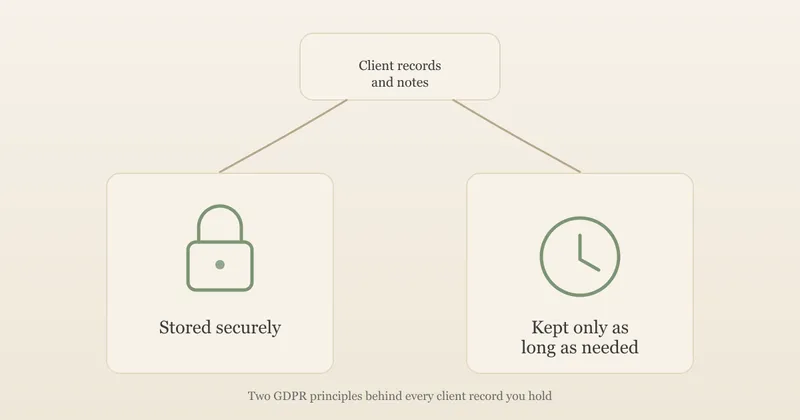
Starting a practice
Practice Management Software for Therapists: How to Choose and Set Up (UK)
Practice software, Microsoft 365, Google Workspace or Proton? How to choose, a UK price snapshot, and a folder system for client notes, contracts and invoices.
On this page14 sections
Practice management software for therapists puts your diary, client records, invoices and sometimes video sessions in one place. But it isn't the only way to run a private practice well. Plenty of counsellors use a business suite such as Microsoft 365, Google Workspace or Proton instead, with a folder system they've set up themselves, and many use a mix of the two.
This guide is for counsellors and psychotherapists in the UK who are setting up, or tidying up, how they store client notes, contracts, invoices and the rest of their practice admin. It compares the three routes, covers what to check before you hand a company your clients' data, shows what published UK prices looked like when we checked on 9 October 2026, and sets out a folder system you can copy whichever route you choose.
The short answer: choose on where the data lives, the contract behind it, and how easily you can find, export and delete a client's records, not on the feature list. Then organise everything so that clinical notes, money and admin never end up in the same folder.
Key takeaways:
- There are three routes: dedicated practice software, a business suite with your own folder system, or a combination of the two.
- You don't need dedicated software to be compliant. You do need appropriate security, data processing terms with each provider, and a system you actually keep to.
- Use a business plan, not a personal account, for anything holding client data.
- A good folder system separates active clients, closed clients, finance and admin, uses client codes instead of names, and keeps the code-to-name list separately and encrypted.
- File finance by tax year: HMRC expects self-employed records to be kept for at least five years after the 31 January deadline.
- Paid entry plans for dedicated software we checked ran from £6.99 to £19.95 a month for one practitioner (one US-priced product was $45), with free plans for up to three clients.
- Check whether your clinical executor could reach your caseload list, whichever system you use.
Important: This is a practical overview, not legal, data protection or tax advice. Your obligations depend on how you work and which professional body you belong to. Read any software terms in full, and check the ICO's guidance, your professional body or an adviser if something isn't clear.
Three ways to run your practice admin
Before comparing products, decide which kind of system suits you:
| Route | What it looks like | Suits | Watch out for |
|---|---|---|---|
| Dedicated practice software | One therapy or health practice system for booking, notes, invoices and often video | Therapists who want booking, reminders and notes in one place without designing anything | Exporting your records if you leave, and paying for features you don't use |
| A business suite plus your own folders | Microsoft 365, Google Workspace or Proton for email, calendar, storage and video, with a folder system you set up | Smaller caseloads, or people who like control and already use one of these suites | You design the structure, the naming and the access rules yourself, and have to stick to them |
| A combination | Practice software for booking and notes, a suite for professional email and admin files | Many established solo practices | Records split across two places unless you decide in advance what lives where |
There's no single right answer. What matters is that you can say, for any piece of client information, where it lives, who can see it, and when it will be deleted.
What practice management software for therapists actually does
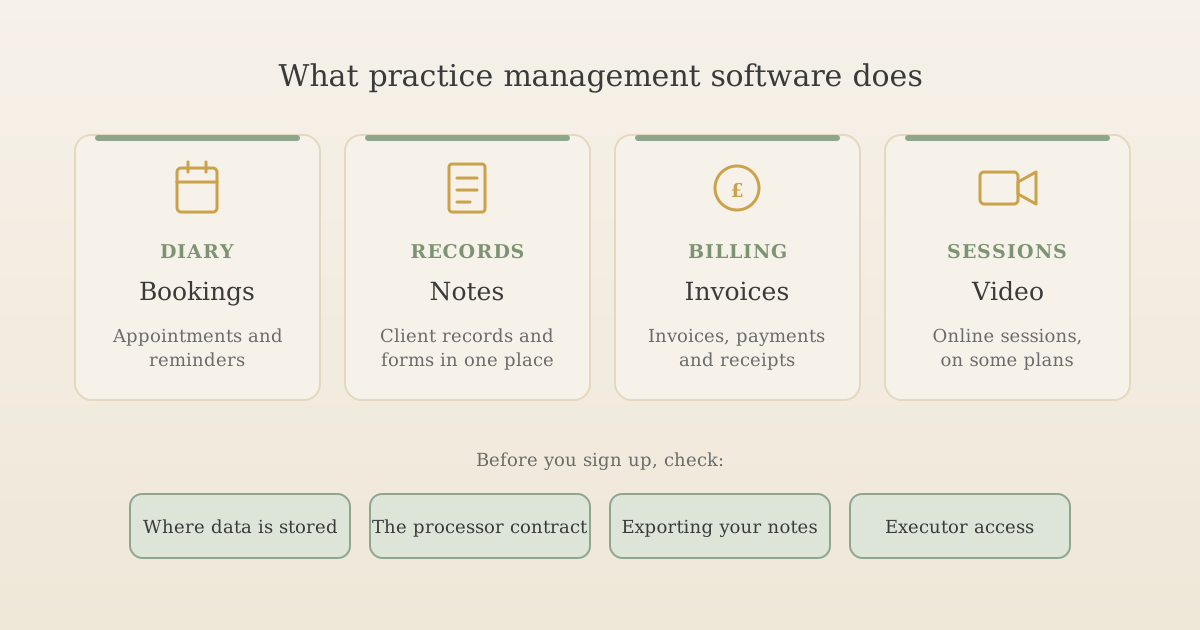
Most products in this category do some combination of four jobs:
- Diary and booking: appointments, recurring sessions, automatic email or text reminders, and often an online booking page clients can use.
- Client records: contact details, session notes, assessment forms and consent records, stored against each client.
- Billing: invoices, receipts, card payments and a record of who has paid.
- Sessions: built-in video calls on some plans, so you don't need a separate video platform.
Some add a client portal, forms clients fill in before the first session, CPD and supervision logs, or AI tools that transcribe or summarise sessions. Many products are built for a range of health practitioners (physiotherapists, dietitians, speech therapists) rather than for counselling specifically, so check how well the notes and forms fit talking therapy before you commit.
Do you need it yet?
No law or professional body requires you to use practice software. What UK data protection law does require is "appropriate technical and organisational measures" to keep client data secure, which you can meet in other ways. Our guide to GDPR for therapists covers those obligations in full.
Where you are in your practice is a better guide than any feature list:
| Where you are | What usually works | When dedicated software starts to make sense |
|---|---|---|
| Starting out, a handful of clients | A business email and storage plan, the folder system below, and a simple spreadsheet of invoices | When you're spending more time chasing payments and rearranging sessions than you'd like |
| A steady solo caseload | Either a well-kept suite and folder system, or one practice management tool | When you want online booking, automatic reminders, or one place for notes and invoices |
| Growing, or working with colleagues | A shared system with separate logins and permissions | Usually straight away: shared folders of client notes are hard to permission properly as a team grows |
One reason to get organised early is your clinical will. If your notes and client list are scattered across a laptop, a notebook and your phone, it's much harder for a colleague to reach your clients if something happens to you. More on that below.
Using Microsoft 365, Google Workspace or Proton
These three come up most often when therapists ask what to use for email, storage, calendar and calls. Each offers business plans with a professional email address, file storage, a calendar with some form of booking page, and video meetings, so one subscription can cover a lot of your admin.
Here's what we found on their own pages on 9 October 2026:
| Microsoft 365 | Google Workspace | Proton | |
|---|---|---|---|
| Entry business plan | Business Basic, £5.40 per user a month paid yearly, excluding VAT | Business Starter, £5.90 per user a month on a one-year commitment (Business Standard £11.80), VAT not stated; introductory discounts for new customers | Workspace Standard, €12.99 per user a month billed yearly (prices shown in euros, Swiss francs or US dollars, not pounds) |
| Booking page for clients | Microsoft Bookings, included on the plans with Teams | Appointment booking pages from Business Standard; not on Starter | Appointment scheduling, up to 25 booking pages |
| Video calls | Microsoft Teams | Google Meet | Proton Meet |
| Storage | 1 TB per user | 30 GB per user on Starter, 2 TB on Standard | 1 TB per user |
| Where data is stored | For a tenant set up in the UK, Microsoft's Product Terms commit to storing Exchange email, SharePoint, OneDrive and Teams chat content at rest in the UK | A data region of the United States or Europe can be chosen on Business Standard and Plus; there's no UK option | Proton is a Swiss company. Its plans page doesn't say where data is stored, so ask |
| Worth knowing | Desktop Word and Excel need Business Standard or above | Google's processor terms come with Workspace; our online counselling guide covers using Meet | Drive files are end-to-end encrypted: Proton says no one but you and people you choose can read them, "Not even Proton" |
A few practical points apply whichever you pick:
- Use a business plan, not a personal account. Processor terms, admin controls and data location commitments usually come with business plans, not free or personal ones. A free Gmail or personal OneDrive account isn't the place for client notes.
- You're building the system yourself. A suite doesn't give you a client record, a notes template or an executor login. The folder system in the next section is what turns storage into a record-keeping system.
- End-to-end encryption cuts both ways. Proton's approach means a breach at Proton shouldn't expose readable files, but it also means a lost password and lost recovery details can mean lost records. Set up recovery options carefully, and think about how your clinical executor would get in.
- Check the AI settings. Google's and Microsoft's plans now include AI assistants, and on some plans these can work with the files in your Drive or OneDrive. Find out what they can access, and what your provider's terms say about that data, before you store client notes alongside them.
- Booking pages come from your provider. Microsoft Bookings, Google's booking pages and Proton's scheduling pages are hosted by the provider, so a client booking through one is giving their details to that service on your behalf. Mention it in your privacy notice.
How to set up a folder system for client records
Whether your notes live in practice software or in a suite, you'll have documents that need a home: signed contracts, assessment forms, letters, invoices, receipts, insurance certificates, CPD records. A clear folder system makes them easy to find, easy to keep secure, and easy to delete on time. Here's one way to set it up. Adapt it to how you work.
A folder structure that works
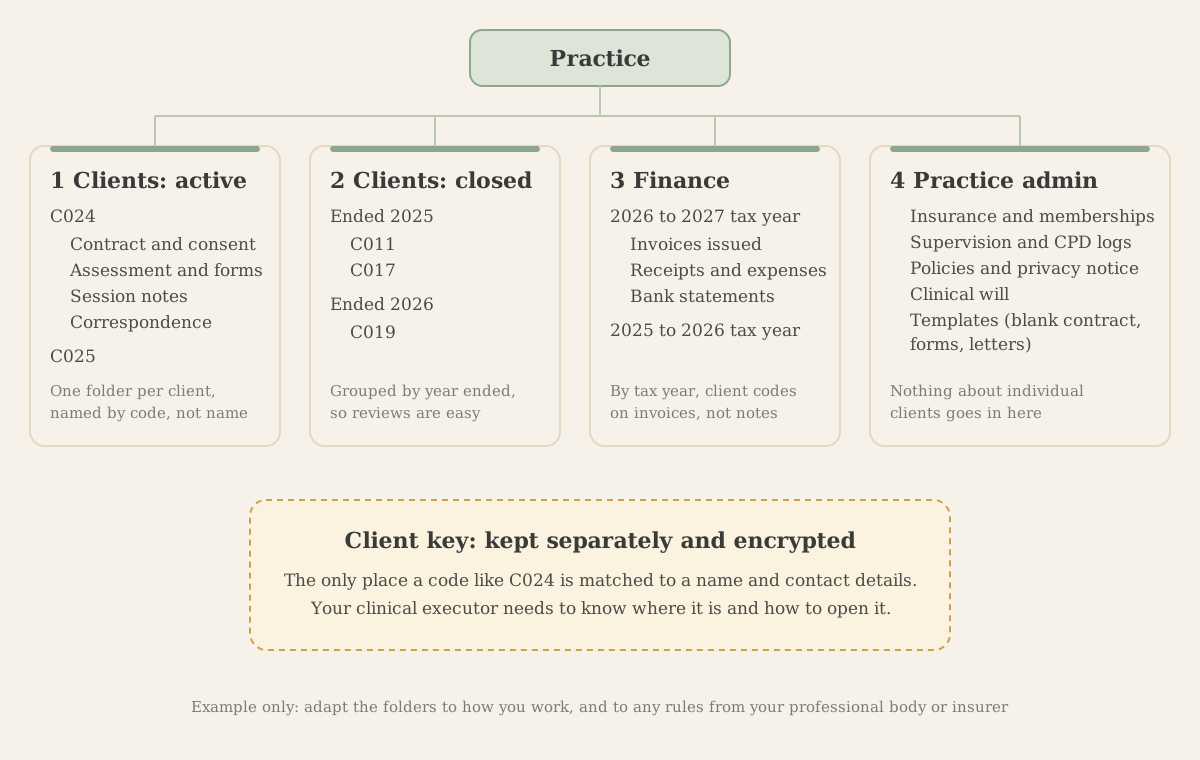
Start with four top-level folders, numbered so they always sort in the same order:
- 1 Clients: active. One folder per current client, each with the same four subfolders: Contract and consent, Assessment and forms, Session notes and Correspondence.
- 2 Clients: closed. When work ends, move the whole client folder here, inside a folder for the year therapy ended.
- 3 Finance. One folder per tax year (6 April to 5 April), each with Invoices issued, Receipts and expenses and Bank statements.
- 4 Practice admin. Insurance certificates, professional body membership, DBS certificate, supervision and CPD logs, your policies and privacy notice, your clinical will, and blank templates. Nothing about individual clients goes here.
Keeping the same subfolders in every client folder sounds fussy, but it's what lets you find a signed contract in seconds, answer a client's request for a copy of their records without missing anything, and hand over cleanly if your clinical executor ever needs to.
Client codes instead of names
Name each client folder with a code such as C024, not the client's name, and use the same code on invoices and in your finance records. Keep the list that matches codes to names and contact details in a separate, encrypted file, with access limited to you (and, through your clinical will, your executor).
This is a safety net, not a loophole. The ICO is clear that pseudonymised data is still personal data for anyone who holds the key, and says that key should be kept separately and secured. What codes do is reduce the damage from everyday slips: a folder synced to the wrong device, a screen seen over your shoulder, a bookkeeper looking at an invoice list. Our Making Tax Digital guide makes the same point about using codes in income records.
Naming files so they sort themselves
Pick one pattern and use it every time. Putting the date first, year then month then day, makes files sort in date order automatically:
- 2026-10-09 C024 session note
- 2026-09-14 C024 signed contract
- 2026-10-01 INV-0187 C024
Avoid putting client names, diagnoses or anything clinical in file names. File names often show up in places the file content doesn't, such as search results, sync notifications and recent-file lists.
Finance folders by tax year
File invoices, receipts and bank statements by tax year rather than calendar year, so everything for one Self Assessment return sits together. GOV.UK says self-employed people must keep records for at least five years after the 31 January submission deadline for that tax year, so your 2026 to 2027 records need keeping until at least January 2033.
That's a different clock from client notes, which is another reason to keep finance separate. Invoices that use client codes can be kept for the tax period without keeping clinical detail for longer than you need it.
Emails and texts
If you're a BACP member, the 2026 Ethical Framework treats records as including all communications about a client, not just session notes. Our BACP Ethical Framework 2026 checklist covers this. In practice, decide where communications live. Some therapists save relevant emails into the client's Correspondence folder. Others keep a mailbox folder per client code and leave a short note in the client folder saying so. Either works if you're consistent, and if texts don't sit only on your personal phone.
Locking it down
A tidy structure needs sensible security around it:
- Two-step verification on every account that holds client data, including email.
- Encrypted devices. Turn on FileVault (Mac) or BitLocker (Windows) and a screen lock on your phone, so a lost laptop isn't a lost caseload.
- Check sharing settings. Client folders should never be shared with "anyone with the link". Review what's shared once a year.
- No shared family devices. Don't sync client folders to a computer or tablet other people use.
- Paper, if you use it. A locked cabinet, with identifying details kept apart from notes, following the same structure as your digital folders.
The ICO's guide to data security covers the wider principles.
Closing a file and deleting on time
When work ends, add the end date to your client key, then move the client's folder into 2 Clients: closed, in the folder for that year. Once a year, put a reminder in your calendar to open the oldest year folders and delete anything past your retention period, including the client's row in your key. Grouping by year ended turns a daunting job into a quick one.
How long to keep client notes is your decision to make and write down. Our guide to GDPR for therapists covers what BACP has said about it and what to check with your insurer.
Six questions to ask before you sign up
When you put client notes into practice software or a business suite, you're still responsible for that data. The ICO calls you the controller and the provider the processor. That shapes most of what's worth checking:
| Ask | Why it matters | A good answer looks like |
|---|---|---|
| Where is my clients' data stored? | If data goes to a separate organisation outside the UK, it's a restricted transfer, and the ICO's international transfers rules apply | A named country or region, and if that's outside the UK, which legal mechanism covers the transfer |
| Do your terms include a processor contract? | The ICO lists what a controller-processor contract must include, such as acting only on your instructions and keeping data secure | A data processing agreement or section in the terms you can read before you pay |
| Can I export every client record, notes included? | Your records need to outlive any one product, including if the company closes or you switch | A full export in a format you can open without their software, such as PDF or CSV |
| What happens to the data when I leave? | The ICO's contract terms include returning or deleting your data at the end, at your choice | A clear process and timescale for return and deletion |
| Who else can get in, and how? | Two-step login and separate user permissions are basic protection for sensitive records | Two-step verification available, and roles so an admin helper can't read notes |
| Can someone else reach my caseload in an emergency? | Your clinical executor may need contact details for every client | An executor or emergency access feature, or a documented workaround |
Most companies answer these in a security, privacy or "GDPR" page, or in their help centre. If you can't find an answer, ask in writing before you start a trial with real client data. A vague reply to a direct question about where data is stored tells you something too.
Getting your notes out again
This is the question most people skip, and the one that matters most later. You may stay with the same system for years, so by the time you want to leave, it could hold your whole clinical history.
Before you commit, start a free trial with an invented test client, write a short note, upload a form and then try to export it. If exporting one record is awkward, exporting three hundred will be worse. It's also worth knowing how you'd answer a client's request for a copy of their records: you should be able to produce one client's file without exporting everyone's.
Reminders that don't give too much away
Automatic text and email reminders cut missed sessions, but think about what they say. A text that pops up on a shared phone's lock screen reading "Reminder: your counselling session tomorrow at 3pm" tells anyone nearby that the person is in therapy. Most systems let you edit the template. Something like "Reminder: appointment with Sam tomorrow, 3pm" does the same job more discreetly. Ask clients at the start how they'd like to be contacted, and note their answer.
AI note-taking features: check before you switch them on
Several practice software products now sell AI tools that record, transcribe or summarise sessions, usually as a paid add-on, and the big business suites build AI assistants into their apps. They can save time, but they also mean the content of a session is being processed by another system.
If you're a BACP member, the 2026 Ethical Framework, which becomes mandatory at midday on 3 November 2026, asks you to be open about the benefits and risks of digital tools and to have informed consent before client data goes into them. Our BACP Ethical Framework 2026 checklist covers what that means in practice. Before you turn an AI feature on, find out:
- whether audio is stored, and for how long;
- whether session content is used to train the provider's models (some say plainly that it isn't; check, don't assume);
- which other companies process the audio or transcript; and
- how a client can say no, and how you'll work with them if they do.
A sentence buried in your booking terms isn't the same as informed consent. A short conversation at the start of work, noted in your records, is easier to stand behind.
What practice management software costs: a UK price snapshot
These are published prices from six dedicated practice management products that came up repeatedly in UK search results for practice management software for therapists, checked on their own pricing pages on 9 October 2026.
This isn't a recommendation or a ranking, and we have no commercial relationship with any of these companies. We haven't used each of these with a real caseload, and the right one depends on how you work: how many clients you see, whether you work online, whether you want built-in video, and how much you'll pay for convenience. The products are listed alphabetically. Prices change, so check the current page before you decide.
| Product | One practitioner, entry plan | Higher plans for one practitioner | Free trial or plan | Where data is stored (company's own statement) | Worth knowing |
|---|---|---|---|---|---|
| Cliniko | $45 a month | $95 a month for two to five practitioners | 30-day trial | UK, for new accounts created in the UK | Priced in US dollars when we checked. VAT not stated |
| Kiku | £6.99 a month | £12.99 and £16.99 a month | 30-day trial | Ireland (Amazon Web Services) | VAT not stated. Texts 5p each on the higher plans. Lists emergency clinical executor access on every plan |
| Konfidens | Free for up to 3 clients | Solo £19 a month (up to 20 active clients), Pro £29 a month (unlimited) | Free plan | EU | Prices exclude VAT. Video calls on paid plans |
| Therasee | Free for up to 3 clients | £19 a month, or £15 a month paid annually | Free plan | UK data centres (pricing page FAQ) | VAT not stated |
| WriteUpp | £19.95 a month (Flex) | £27.95 a month (Solo), £49.95 with an AI scribe | 30-day trial | Dublin, Ireland (Microsoft) | Prices exclude tax. Online booking is a £4.95 a month add-on on Flex, included on Solo |
| Zanda | £15 a month (£7.50 for the first six months) | Growth from £25 a month, plus £15 per extra practitioner | 14-day trial | UK (Amazon Web Services) | VAT not stated. The entry plan is capped at 1,000 appointments |
A few things stand out. Entry prices sit in a fairly narrow band for a solo practitioner. Several prices either exclude VAT or don't say, so if you're not VAT-registered, you can't reclaim it, and a price that excludes VAT will cost you 20% more. The free plans we found are limited to three clients, which suits a trial or a very small caseload rather than a full practice, and Konfidens's Solo plan caps active clients at 20. Extras such as text reminders, video and AI tools are where costs climb.
On storage, three of the six say they keep data in the UK and three in Ireland or elsewhere in the EU. Storage in the EU isn't a problem in itself: the UK government's position is that UK law allows the free flow of personal data to EEA states. What matters more is that the company can tell you clearly, in writing, and that the answer covers backups and any companies it uses to process data too.
A worked example: cost per session
Here's an invented example of a full-time solo counsellor comparing three options.
Alex sees 18 clients a week for 44 weeks a year, so about 792 sessions a year, and isn't VAT-registered.
- Microsoft 365 Business Basic with a folder system: £5.40 a month plus 20% VAT is £6.48, or £77.76 a year. That covers email, storage, Bookings and Teams. About 10p per session, but Alex builds and maintains the record-keeping system and sends invoices separately.
- Kiku Therapy Planner: £12.99 a month is £155.88 a year. Texts cost 5p each, so one reminder per session adds £39.60. Total: £195.48 a year, about 25p per session. (VAT isn't stated on the pricing page; ask before you rely on this figure.)
- WriteUpp Solo: £27.95 a month excluding tax, plus 20% is £33.54 a month, or £402.48 a year. Solo includes 100 texts a month, which covers Alex's roughly 66 reminders. Total: £402.48 a year, about 51p per session.
The gap between the cheapest and dearest option is about £325 a year, under five sessions at a £70 fee. That's real money, but it's small next to the cost of a system that doesn't suit how you work, or one you can't easily leave. The options also include different things: many therapists using dedicated software still pay for a business email plan as well. Compare against what you'll actually use. Our guide to pricing a private practice shows how running costs like this feed into your session fee.
If your income is approaching the Making Tax Digital threshold, don't assume your practice software handles that too. Invoicing clients isn't the same as sending quarterly updates to HMRC. Check HMRC's MTD software finder for the product you're considering.
Connecting practice software to your website
Most practice management tools and business suites offer an online booking page. There are two common ways to connect it to your website, and they behave differently.
A "Book a session" button that links out. The client clicks a button on your site and lands on the booking page on the provider's site. It's simple, it works on any website, and your own site doesn't load anything extra from the booking company.
An embedded booking calendar. The calendar appears inside a page on your site. It looks seamless, but the embedded calendar comes from the provider and may set cookies or similar technologies on your visitors' browsers. If those aren't strictly necessary, you need consent before they load. Our GDPR-compliant website checklist explains how embeds and cookie consent work.
When we connect a client's booking system to their website, we set up either a clear button or an embedded calendar, and an embedded calendar only loads once the visitor has agreed to cookies, where that's needed. Whichever you choose, put your fees, session length and cancellation terms on the page before the booking step, so nobody books without knowing what they're agreeing to. Our guide to what a therapist website should include covers the rest of a contact or booking page.
Should new clients book straight in?
Not every practice wants a stranger booking a full session online. Many therapists prefer a short introductory call or an enquiry first, to check they're a good fit and to cover anything safeguarding-related before work starts. A common pattern is:
- New clients: an enquiry form or a bookable free introductory call.
- Existing clients: online booking or rescheduling for regular sessions.
Most booking tools let you offer different appointment types, so you can make only the introductory call publicly bookable. Keep your enquiry form short, and say beside it not to send detailed personal or clinical information through it.
Your clinical executor and your system
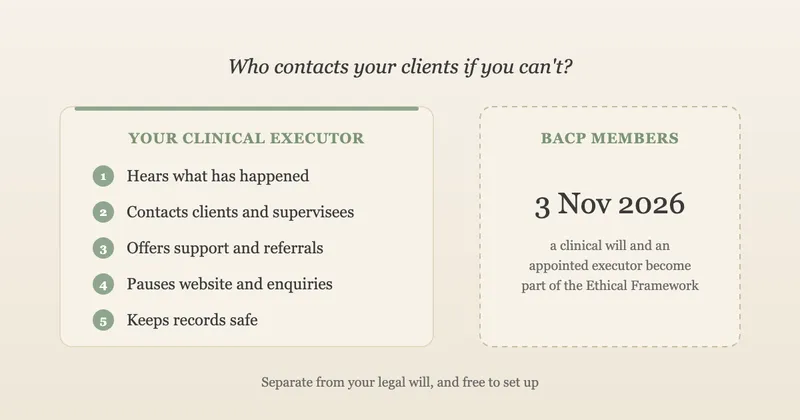
If you die or suddenly can't work, your clinical executor needs to contact every current client. Whatever system you use, that means they need a way in, without you there to unlock it.
At least one product we checked lists emergency clinical executor access as a feature on every plan. If yours doesn't, or you use a suite and folders, you need a workaround. With the folder system above, the key piece is your encrypted client key: your executor needs to know where it is and how to open it, through something like a sealed envelope or a password manager's emergency access feature. Our clinical will guide and free template covers the options and what to write down.
Whichever route you choose, record it in your clinical will and test it once a year. A login your executor can't use is no better than no login at all.
Common mistakes
- Picking on features, not exit. The ability to export everything matters more in year five than a slick diary does in week one.
- Using a personal account for client data. Free and personal plans often don't come with the processor terms and controls a business plan does.
- Client names in folder and file names. They show up in search results, sync alerts and recent-file lists. Use codes.
- Notes, invoices and admin in one folder. They have different retention periods and different people may need to see them. Keep them apart from day one.
- Putting real client data into a trial. Use invented test clients until you've decided and read the terms.
- Assuming "GDPR compliant" on a sales page settles it. You're still the controller. Read the processor terms and find out where data is stored.
- Records in two places by accident. Notes in the software, but client emails and texts on your personal phone. Decide where each kind of record lives.
- Never deleting anything. A retention period only works if a yearly review actually happens.
- Forgetting the website side. An embedded calendar can add cookies your privacy and cookie notices don't mention.
For the wider set-up steps that sit around this choice, from insurance to policies, see our guide to setting up a private therapy practice in the UK.
Frequently asked questions
Do I need practice management software as a counsellor?
Not necessarily. No professional body or law requires it. UK data protection law requires appropriate security for client data, which you can meet with a business email and storage service, a clear folder system, encrypted devices and a simple invoice record. Dedicated software starts to earn its cost when you want online booking, automatic reminders and notes in one place, or need a reliable way for a clinical executor to reach your client list.
Can I use Google Workspace, Microsoft 365 or Proton to store client notes?
Many therapists do. Use a paid business plan rather than a personal account, check the provider's data processing terms and where data is stored, turn on two-step verification, and set up a folder system that keeps clinical notes, finance and admin apart. You'll be building the structure yourself, so plan how files are named, who can see them, and how you'll find and delete a client's records later.
How much does therapy practice management software cost in the UK?
Published prices we checked on 9 October 2026 started at £0 for free plans limited to three clients. Paid entry plans for one practitioner ran from £6.99 to £19.95 a month, plus one product priced at $45 a month in US dollars, and several prices exclude VAT. Add-ons such as text reminders, video and AI note-taking cost extra on some plans. For a full-time solo practice the cost per session is usually well under £1.
How should a therapist organise client files?
Keep active clients, closed clients, finance and practice admin in separate top-level folders. Give each client a folder named with a code rather than their name, with subfolders for contract and consent, assessment, session notes and correspondence. Keep the list that matches codes to names separately and encrypted, file finance by tax year, and group closed files by the year therapy ended so retention reviews are quick.
The short version
Decide first whether you want dedicated software, a business suite with your own folders, or both. Whichever you pick, use a business plan, check where the data lives and what the processor terms say, and test exporting a record before real client data goes in. Set up folders that keep active clients, closed clients, finance and admin apart, with codes instead of names and the key kept separately. Make sure your clinical executor can get in. Then connect your booking to your website in a way your cookie notice actually covers.
Connect your booking system to a website that's ready for it
UpTopWeb builds calm, professional websites for counsellors and therapists, and connects the booking system you already use, as a clear button or a calendar that respects cookie consent, with your fees and terms on the page.
Further reading
Related articles
Starting a practice13 minute read
GDPR for Therapists: A Guide to Client Records and Data Protection
Starting a practice14 minute read
Clinical Will for Therapists: Free UK Template and Guide
Starting a practice11 minute read
How to Set Up a Private Therapy Practice in the UK