Therapist websites
Website Accessibility for Therapists: A UK Guide
What UK law actually requires for therapist website accessibility, what WCAG 2.2 AA means in practice, and the most common mistakes to fix first.
On this page8 sections
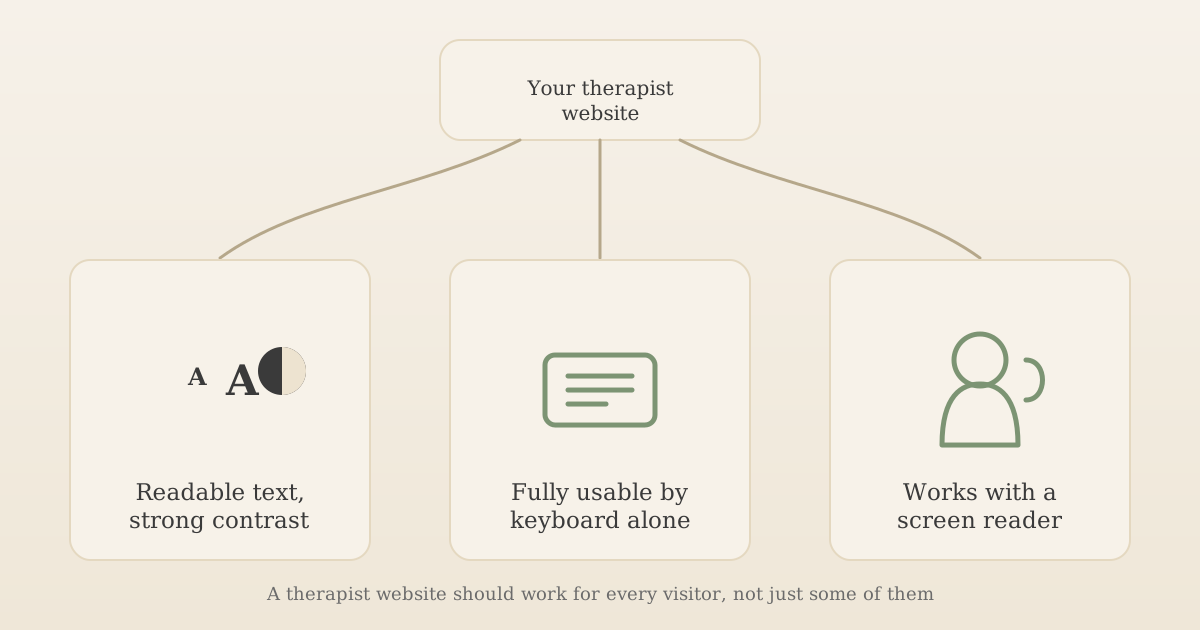
Website accessibility for therapists isn't just a nice-to-have: a site that's hard to read, impossible to navigate by keyboard, or invisible to a screen reader turns away exactly the people therapy is meant to reach, whether that's someone anxious, someone with a visual or motor impairment, or someone reading it during a period of low concentration. Our guide to what a therapist website should include covers accessibility as one of several essentials; this guide goes deeper into what UK law actually requires, what the WCAG 2.2 standard means in plain terms, and the mistakes worth fixing first.
Key takeaways:
- Public-sector accessibility law (WCAG 2.2 AA under PSBAR 2018) doesn't apply to a private therapy practice, but the Equality Act 2010 does, and it covers websites.
- The Equality Act requires "reasonable adjustments," not a named technical standard, but WCAG 2.2 AA is the practical benchmark used to judge what's reasonable.
- The most common accessibility mistakes on therapist websites are low-contrast text, mandatory phone-only contact, missing form labels and images with no meaningful alt text.
- A keyboard-only test and a contrast check take a few minutes and catch a large share of common problems.
Important: This is a practical overview, not legal advice. Whether a specific adjustment is "reasonable" depends on your circumstances and is ultimately a legal question. If you're concerned about a specific situation, get advice from a solicitor or contact the Equality Advisory and Support Service.
Why this matters more for a therapy website than most
Every website benefits from being accessible, but the stakes are higher here. People search for a therapist while dealing with anxiety, depression, chronic pain, sensory sensitivities, or a visual, hearing or motor impairment, sometimes several at once. If your site is the first point of contact, and it's hard to read, can't be operated without a mouse, or doesn't work with the screen reader a blind visitor relies on, you've excluded someone before they ever got the chance to decide whether you're the right fit for them.
It's also a trust signal in its own right. A calm, readable, easy-to-navigate site quietly tells a stressed visitor that you've thought about their experience, which matters in a decision this personal.
Is website accessibility actually a legal requirement in the UK?
The honest answer is more nuanced than most agency blog posts make it sound, so it's worth separating two different pieces of law.
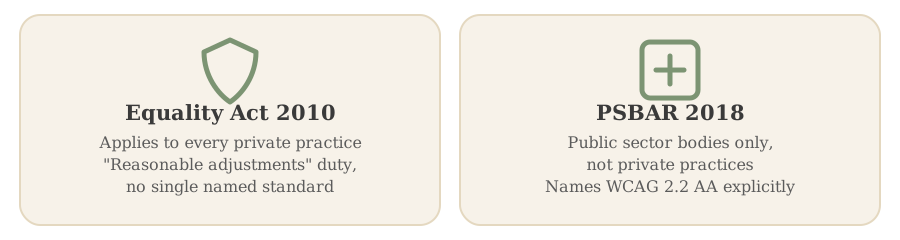
The Public Sector Bodies (Websites and Mobile Applications) (No. 2) Accessibility Regulations 2018 require public sector websites to meet the Web Content Accessibility Guidelines (WCAG) 2.2 AA standard, named explicitly in the regulations. This law applies to central and local government, the NHS, and similar public bodies. It does not apply to a private therapy practice.
The Equality Act 2010 is the one that does apply to you. It covers both private and public organisations providing a service, and Scope, the UK disability equality charity, confirms it covers digital services, including websites, apps and documents such as PDFs, not just physical premises. The Act creates a duty to make "reasonable adjustments" so disabled people aren't put at a substantial disadvantage compared with anyone else trying to use your service. Crucially, the Act itself doesn't name a specific technical standard, unlike PSBAR's explicit WCAG 2.2 AA requirement for the public sector.
In practice, that means there's no simple compliance checklist you can tick off and call it done. What counts as "reasonable" depends on your size and resources as a business, which is generally forgiving for a solo practitioner compared with a large organisation. But the duty is real, ongoing and anticipatory (you're expected to think ahead, not just react to a complaint), and Scope's guidance is explicit that a claim can end up in the UK courts. Since WCAG 2.2 AA is the one technical standard with actual legal force in UK web accessibility law, even though only for the public sector, treating it as your practical target is the sensible way to give substance to the Equality Act's broader duty, rather than guessing at what "reasonable" might mean.
What WCAG 2.2 AA actually means in practice
WCAG stands for Web Content Accessibility Guidelines, maintained by the W3C. It's organised around four principles: content should be perceivable, operable, understandable and robust. Translated into what actually shows up on a therapist website, the AA level covers:
- Colour contrast: body text needs a contrast ratio of at least 4.5:1 against its background. A lot of "calming" pastel colour schemes, pale grey text on a cream background, quietly fail this.
- Keyboard access: every link, button and form field must be reachable and usable using only the Tab, Shift+Tab and Enter keys, with a visible focus outline showing where you are.
- Meaningful alt text: images that carry information (a diagram, an icon with meaning) need alt text describing that information. Purely decorative images should have empty alt text so a screen reader skips them rather than reading out something unhelpful.
- Text resize and reflow: your site should stay usable when a visitor zooms to 200%, without text overlapping or content getting cut off.
- Reduced motion: if you use scroll animations or transitions, they should respect a visitor's operating-system preference for reduced motion, since motion can trigger discomfort or distraction for some visitors.
- Non-colour status indicators: don't rely on colour alone to show a required field or a form error; pair it with text or an icon, since colour-blind visitors and screen reader users won't perceive colour-only signals.
None of this requires hiring an accessibility specialist for a typical therapist website. It requires checking these specific things rather than assuming a modern website builder or theme handles them by default, which many don't.
Common accessibility mistakes on therapist websites
A quick scan of live UK therapist and counsellor sites turns up the same handful of problems repeatedly:
- Contact forms that only accept a phone number, with no email or text alternative, which excludes anyone who finds phone calls difficult, including some autistic and Deaf visitors.
- Credential or qualification images with no alt text, so a screen reader user can't tell what the image actually shows or verify a claimed qualification.
- Low-contrast text, especially light grey or pale colour body copy on an off-white background, chosen for a "soft" aesthetic that fails the 4.5:1 contrast ratio.
- Missing form labels, where a field only shows placeholder text that disappears once you start typing, so a screen reader announces nothing useful and a visitor who gets distracted mid-form loses their place entirely.
- Autoplaying background video or animation with no way to pause it, which can be genuinely distressing for visitors with certain sensory or attention-related conditions.
Most of these take minutes to fix once you know to look for them; the harder part is knowing they're a problem in the first place, since they're invisible if you don't rely on the workaround they break.
Several of these fixes overlap directly with technical SEO, since semantic headings and meaningful alt text help both a screen reader and a search engine understand your page; see our beginner's guide to SEO for therapists if you want the fuller picture on the technical side.
A practical checklist you can run yourself
You don't need specialist tools for a first pass:
- Keyboard-only test: unplug your mouse (or just don't touch it) and Tab through your entire site. Can you reach every link, button and form field, and can you always see where the focus is?
- Contrast check: use a free contrast checker (the W3C lists several) on your body text and any text over a coloured background.
- Alt text audit: go through every image on your site and ask whether a screen reader user would lose real information if it were missing.
- Form check: confirm every field has a visible, persistent label, not just placeholder text, and that submitting with an error announces what went wrong in text.
- Zoom test: zoom your browser to 200% and check nothing overlaps, gets cut off, or becomes impossible to click.
If you're briefing a designer or developer rather than checking an existing site yourself, GOV.UK's introduction to making a service accessible is a clear, non-technical brief you can hand over directly.
Does your platform make this easier or harder?
Some website builders bake in reasonable accessibility defaults (semantic headings, keyboard navigation, alt text fields); others leave every one of these decisions to you, template by template. If you're still choosing how to build your site, our comparison of website builders against a custom or done-for-you website is worth reading alongside this guide, since the platform you pick affects how much of this work is done for you versus left for you to catch yourself.
Frequently asked questions
Is website accessibility a legal requirement in the UK?
Not in the specific way it is for the public sector. Public bodies must meet WCAG 2.2 AA under the Public Sector Bodies Accessibility Regulations 2018, but that law doesn't apply to a private therapy practice. The Equality Act 2010 does apply, and covers digital services including websites: it requires service providers to make reasonable adjustments so disabled people aren't excluded, though it doesn't name a single technical standard you must hit.
Do I need to follow WCAG 2.2 specifically?
You're not legally required to as a private practice, but it's the recognised, testable technical standard for web accessibility, and the one named explicitly in the public-sector law that does carry a legal mandate. Aiming for WCAG 2.2 AA is the practical way to give substance to the Equality Act's broader 'reasonable adjustments' duty, even without a specific obligation to hit every clause.
Can I be sued in the UK for having an inaccessible website?
Yes, in principle. Scope, the UK disability equality charity, confirms that anyone who believes they've been discriminated against by a service provider, including through an inaccessible website, can bring a claim in the UK courts under the Equality Act. Claims against small private practices are rare in practice, but the legal exposure is real, not theoretical.
What's the quickest way to check if my therapist website is accessible?
Run the whole site using only your keyboard's Tab and Enter keys and see if you can reach and use every link, button and form field. Then check your body text contrast with a free contrast checker tool. Those two checks alone catch a large share of the most common problems, though they're a starting point, not a full audit.
Start with the two checks that catch the most
You don't need to become an accessibility expert to make real progress. Start with the keyboard-only test and a contrast check on your body text; between them, they catch a large share of the problems that quietly turn visitors away. Then work through the rest of the checklist as time allows, treating it the same way you'd treat any other part of the site: worth doing properly, not worth being paralysed over.
If you haven't yet worked through the full list of what a therapist website needs, our guide to what a therapist website should include covers the essential pages and trust signals alongside accessibility. And if cost is part of what's holding you back from fixing an older site, see our breakdown of how much a therapist website costs to plan a realistic budget for the work.
A website built accessible from the start
UpTopWeb builds calm, professional websites for counsellors and therapists with readable contrast, keyboard access and screen reader support already built in, not bolted on afterwards.
Further reading
Related articles
Therapist websites10 minute read
Therapist Website Security: What PHP2Shell Means for You
Therapist websites16 minute read
Therapist Service Pages: Does Each Specialism Need Its Own Page?
Therapist websites13 minute read
Squarespace vs Wix for Therapists: A Fair UK Comparison