Therapist websites
Squarespace vs Wix for Therapists: A Fair UK Comparison
Squarespace or Wix for your therapy practice? UK prices, booking, redesigns, cookie settings and leaving later, compared for counsellors and therapists.
On this page12 sections
Squarespace vs Wix is usually the first real decision a therapist makes once they've settled on building their own website. Both are capable, both are used by plenty of UK counsellors and psychotherapists, and most online comparisons are written for shops, photographers or US therapists paying in dollars. This guide compares Squarespace vs Wix for therapists specifically: UK prices in pounds, online booking, what happens when you want a new look in two years, the cookie and privacy settings a UK practice has to switch on, and what leaving either platform involves.
Key takeaways:
- For a simple practice website, both platforms are genuinely good enough. The words, photos and practical details on your pages will matter more than which one you choose.
- Wix is cheaper to start (it has a free plan, and its £9 Light plan undercuts Squarespace's £12 Basic) and includes online booking from its Core plan. Wix adds VAT to its prices; Squarespace's pricing page doesn't say either way.
- Squarespace is the easier one to change your mind on: you can completely restyle a Squarespace site, while a Wix template can't be swapped once your site is built.
- Neither one sets up UK cookie consent, a privacy notice or a sensible enquiry form for you. The tools are there on both, but you have to switch them on.
- Leaving either platform means a rebuild, so pick the one you'd be happy to stay on.
Important: This is a practical overview, not legal, technical or professional advice. Prices and plan features are as shown on each platform's own UK pricing pages and help centres when we checked between 23 and 25 September 2026, and both platforms change them over time. Check the current pages before you buy. UpTopWeb has no connection with Squarespace or Wix.
Squarespace vs Wix for therapists at a glance
| Squarespace | Wix | |
|---|---|---|
| Cheapest plan for a practice site | Basic: £12/month paid yearly, or £16 paid monthly | Light: £9/month paid yearly, plus VAT. Monthly price is higher and only shown at checkout |
| Free option | 14-day free trial | Free plan (with Wix branding and no custom domain), plus a 14-day money-back guarantee on your first paid plan |
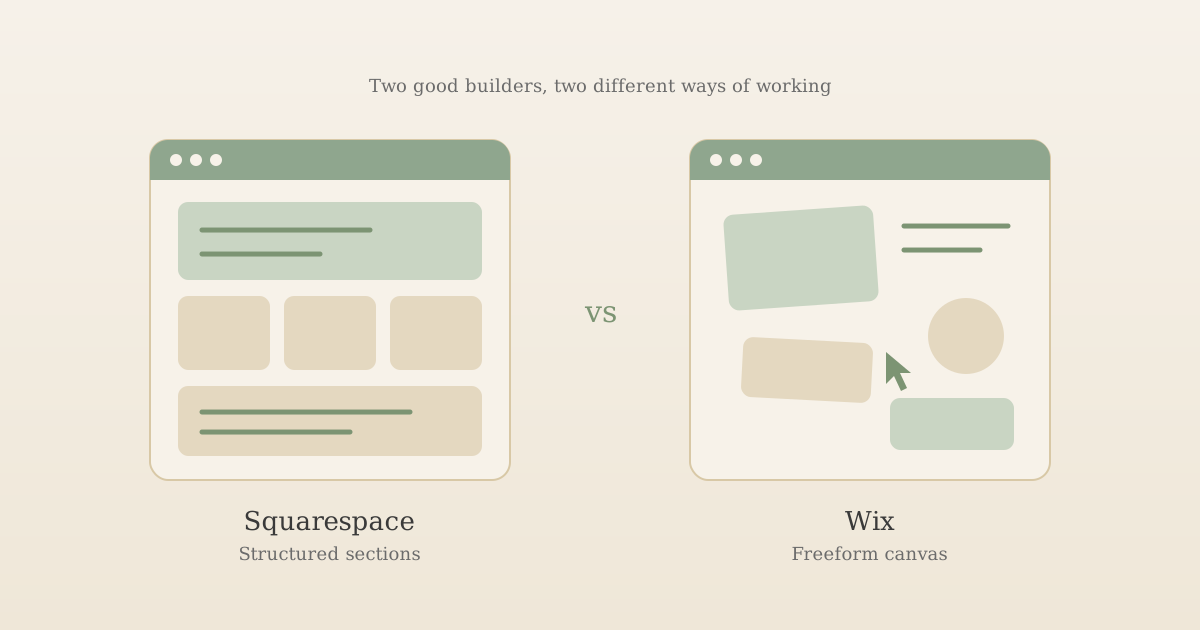
| How you build | Structured sections that stack down the page | A freer drag-and-drop canvas, or a first draft from Wix's AI builder |
| Changing the design later | Restyle the whole site any time; there's no template to switch | You can't switch template on an existing site |
| Online booking | Acuity Scheduling, a separate subscription | Included on Core (£16/month paid yearly, plus VAT) and above |
| Free domain | First year free on yearly plans | First year free on most paid plans, for a new domain bought through Wix |
| Cookie consent | Built in; you set non-essential cookies to "Restrict" | Built in; you add the cookie banner from your dashboard |
| Leaving later | Partial export (some pages, text and images, no design) | No export; Wix sites have to run on Wix |
What you'll actually pay in the first year
Headline prices on both platforms are yearly plans shown as a monthly figure, so the fairest comparison is what leaves your account in year one. Paying a year upfront, at the prices shown between 23 and 25 September 2026:
- Wix Light: £9 × 12 = £108, plus VAT at 20% = £129.60
- Squarespace Basic: £12 × 12 = £144 (the UK pricing page doesn't say whether VAT is included, so check the total at checkout)
- Wix Core (adds booking and payments): £16 × 12 = £192, plus VAT = £230.40
- Squarespace Core: £17 × 12 = £204, with Acuity Scheduling on top if you want online booking
If you'd rather pay month by month, Squarespace shows you the price upfront (£16 for Basic, a third more than the yearly rate). Wix only shows its monthly prices once you're at checkout. Either way, the first-year free domain renews at the normal price in year two, so budget for that too.
For most solo practices, the cheapest plan on either platform covers everything a therapist website needs: a handful of pages, a contact form and your own domain. The higher plans mostly add selling features, like shops, courses and memberships. For how these figures sit against paying a freelancer or a done-for-you service, see our full breakdown of how much a therapist website costs.
Building your site: structured sections vs a free canvas
This is the difference you'll notice on day one.
Squarespace builds every page from sections stacked on top of each other, with content placed on a grid inside each one. It's harder to make a mess with: things line up, spacing stays consistent, and the mobile version mostly takes care of itself. The trade-off is that when you want something positioned exactly where you picture it, you're working within that structure.
Wix gives you more freedom. You can drag almost anything almost anywhere, and Wix's AI builder will generate a whole first draft from a short description of your practice. That freedom cuts both ways: it's easy to end up with a page that looks fine on your laptop and cramped on a phone, which is where most prospective clients will first see it.
For a therapist, "calm and easy to read" tends to beat "visually ambitious". A client arriving anxious wants to find who you help, where you work, what it costs and how to get in touch without hunting. Either platform can do that well; Squarespace's structure just nudges you towards it. Our guide to what a therapist website should include covers what those pages need, whichever you choose.
If you use Wix's AI builder, or any AI tool for your words, check every sentence it produces about your registration, training and the issues you work with. Those details carry professional body and advertising rules, and an AI draft doesn't know your practice. Our guide to writing therapist website copy shows what good practice-specific wording looks like.
Changing your mind later: templates and redesigns
This is the difference most comparisons skip, and it matters more for a practice than for a one-off project, because your practice will change. You'll add a specialism, start online sessions, raise your fees or simply want it to look less like the site you built in your first month.
On Wix, the template you start with is permanent. Wix's own help centre says that "it's not possible to switch to a different template for a site you already created"; a new look means creating a new site and moving your content across by hand.
On Squarespace, there isn't really a template to be stuck with. Squarespace's help centre explains that all version 7.1 sites are part of the same template family, with the same features and style options, so the template you pick is only a starting point. You can change fonts, colours and layouts across the whole site without rebuilding it.
If you expect to refresh your site as your practice grows, this is the strongest practical reason to choose Squarespace.
Online booking: included on Wix, a separate subscription on Squarespace
Wix includes scheduling and online payments on its Core plan and above (not on Light), all inside the same account as your website. Squarespace's booking tool, Acuity Scheduling, is a separate product with its own subscription, paid on top of your website plan.
Before paying for either, ask whether you actually want clients booking straight into your diary. Many therapists prefer a short introductory call or an enquiry first, to check they're the right fit before anyone commits to a session. A booking form also collects more personal information than a simple enquiry form, and the fact that someone is booking therapy can itself be sensitive. If you do add one, keep the questions to the minimum you need to arrange the appointment.
Cookies and privacy: the same job on both
Neither platform can make your site fit UK privacy rules on your behalf. Both give you the tools, and on both it's your job to check they're switched on and set up the way you need.
Under the UK's storage and access rules, you need consent before placing non-essential cookies, such as analytics or embedded maps, on a visitor's device; the ICO's guidance on storage and access technologies sets out what that means in practice. On Squarespace, that means checking that non-essential cookies are set to "Restrict" in your cookie settings and that the cookie banner is on. On Wix, it means adding the cookie consent banner from the Privacy & Cookies section of your dashboard.
You'll also need to write your own privacy notice and set up your contact form so it doesn't invite clinical detail. Our GDPR compliant website checklist for therapists walks through each of these, and none of it depends on which platform you chose.
Leaving later: both mean a rebuild
Neither platform lets you pack up your finished site and take it elsewhere.
Wix is the stricter of the two. Its help centre explains that because Wix is a hosted service, your site must run on Wix's servers: there's no export at all. Squarespace has a partial export, designed for moving to WordPress, that covers some page types, one blog, and text and image blocks, but not your style settings or design.
On both, your domain name can move with you, and you can take your written content and photos. What you can't take is the site itself. So treat this as a platform you plan to stay on, not a stepping stone you'll migrate from cleanly.
Which one suits your practice?
Squarespace is likely the better fit if you:
- want a calm, structured site without spending hours on alignment and the mobile layout
- expect to change the look as your practice grows, and don't want to start again when you do
- don't need online booking, or are happy to pay separately for Acuity Scheduling
Wix is likely the better fit if you:
- want to start on a free plan while you're still testing private practice
- want online booking and payments built into your website plan from the start
- enjoy designing, and want more freedom to place things exactly where you picture them
Either will do if you need a simple site of four or five pages with a contact form, and you're willing to put the time into writing it well. At that point, the platform is the least important decision you'll make.
Two real practices that started on Wix and Squarespace
The clearest way to show that the platform matters less than what's on the page is with two real practices we've redesigned, one that started on Wix and one on Squarespace. Both are shared with the practitioners' permission.
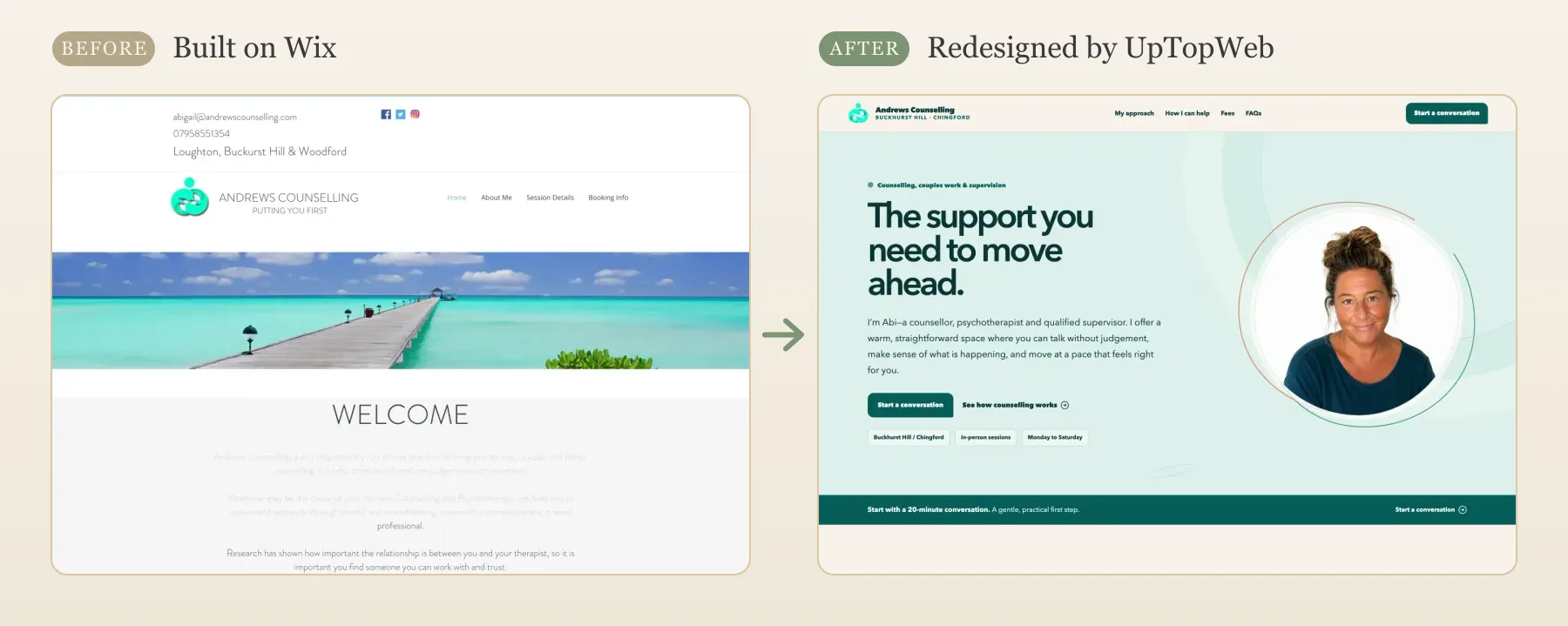
Andrews Counselling (Wix). The old homepage led with a stock photo of a pier and a "Welcome" heading, with the introduction set in pale grey text that's hard to read. There was no photo of Abi, the counsellor, anywhere on the first screen. The redesign opens with her portrait, says in the first two lines that she's a counsellor, psychotherapist and qualified supervisor, shows where and when she works, and offers one clear first step: a 20-minute conversation. The full Andrews Counselling redesign shows the rest of the site.
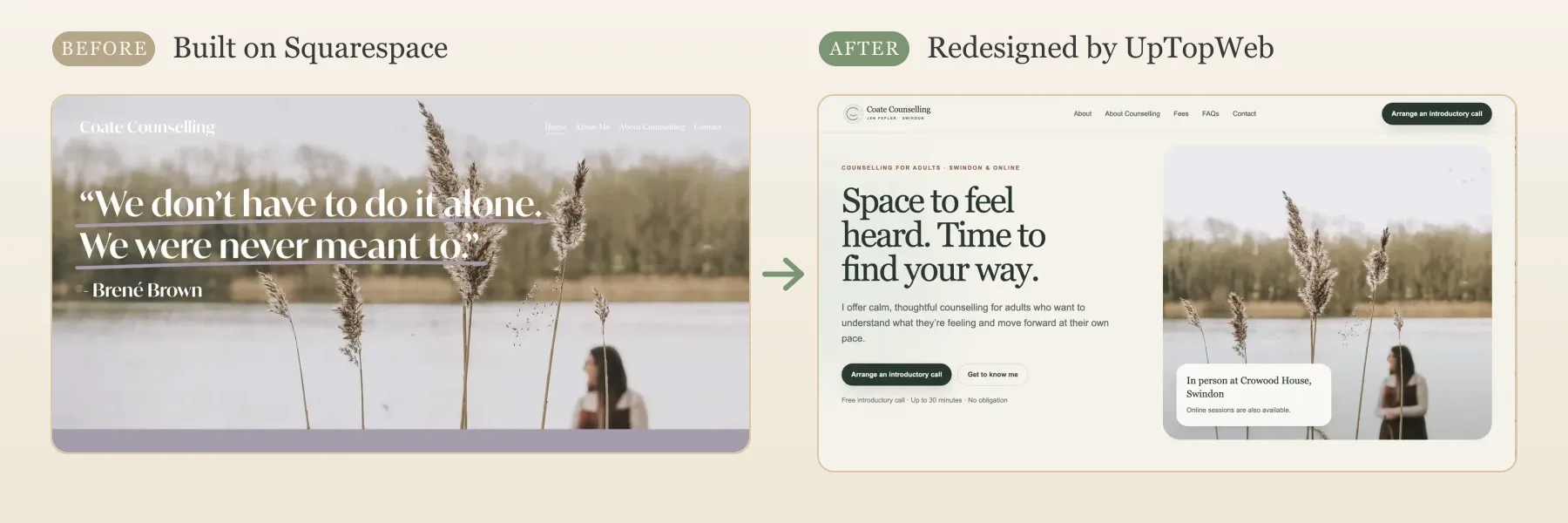
Coate Counselling (Squarespace). The old homepage was a beautiful photograph with a quote over it, but a visitor couldn't tell who the counsellor worked with, where, or how to start. The redesign keeps the same photograph. What changed is everything around it: who the counselling is for, that it's in Swindon and online, the venue, and a free introductory call of up to 30 minutes with no obligation. The Coate Counselling redesign is on our websites for therapists page.
Neither of these problems was caused by Wix or Squarespace, and both could have been fixed on either platform. If you're building your own site, the same four changes are worth copying:
- Show yourself. A real photo of you, or of the room where you work, does more than any stock landscape.
- Answer the first questions on the first screen: who you help, where you work, whether you offer online sessions, and what the first step is.
- Offer one clear first step, and say what it involves: how long it takes, whether it's free, and that there's no obligation.
- Make the text easy to read. Pale grey text on a light background can look elegant, but it's hard to read and can fail the contrast checks in accessibility guidelines; our guide to website accessibility for therapists explains how to check your contrast.
Both practices chose to have the rebuild done for them rather than redo it on their old platform, which is the choice the next section is about.
What neither platform does for you
Choosing between Squarespace and Wix decides which editor you'll spend your evenings in. It doesn't decide whether the site brings in enquiries. On both, you're still the one writing every page, choosing photos, setting up page titles and descriptions for Google, configuring cookie consent and keeping your fees and availability up to date. Our SEO for therapists guide covers the search basics that apply on either platform.
For comparison, a done-for-you service like ours costs £191.90 a year, about £48 more than Squarespace Basic's listed yearly price, and that covers the design, writing, setup and ongoing edits you'd otherwise do yourself. It doesn't include online booking as standard, so if that's essential from day one, Wix Core is the closer match.
If GoDaddy's AI builder, Airo, is also on your shortlist, our guide to the best website builder for therapists compares all three. If you're still deciding whether to build it yourself at all, our comparison of a website builder against a custom or done-for-you website weighs up that bigger question. And if you've already tried one of these and want to see the alternative side by side, we've compared UpTopWeb with Squarespace and Wix directly.
Frequently asked questions
Is Squarespace or Wix better for therapists?
Neither is better across the board. Squarespace suits a therapist who wants a calm, structured site and the freedom to restyle it later without starting again. Wix suits a therapist who wants a free plan to start on, or online booking and payments included in the website plan (from its Core plan). For a simple practice site, the writing, photos and practical details on the pages matter more than which of the two you pick.
Which is cheaper for a UK therapist, Squarespace or Wix?
On headline price, Wix's Light plan (£9 a month on a yearly plan) is lower than Squarespace's Basic plan (£12 a month on a yearly plan), but Wix adds VAT on top, which brings Light to about £129.60 for the first year against £144 for Squarespace Basic. If you want online booking, Wix's Core plan includes it, while Squarespace needs a separate Acuity Scheduling subscription. Prices were checked between 23 and 25 September 2026 and change, so check both pricing pages before you commit.
Can I take online bookings on Squarespace or Wix?
Yes on both, in different ways. Wix includes scheduling and online payments on its Core plan and above, but not on Light. Squarespace uses Acuity Scheduling, which is a separate subscription on top of your website plan. Many therapists prefer an enquiry or a free introductory call before any booking, so it's worth deciding whether you actually need self-service booking before paying for it.
Can I move my site from Wix to Squarespace later, or the other way round?
Not as a transfer. Wix sites can't be exported at all, and Squarespace's export only covers some content and none of the design, so switching platforms means rebuilding your pages on the new one. Your domain name, written content and photos can come with you. That's why it's worth choosing carefully at the start rather than planning to switch later.
Pick the one you'd be happy to stay on
Squarespace and Wix are closer than their marketing suggests, and for most therapists either will produce a perfectly good site. Decide on the two things that are hard to undo: whether you'll want to redesign later (Squarespace makes that easier) and whether you need booking built in (Wix includes it). Then spend your energy on what clients actually read.
Rather not build it in either?
UpTopWeb designs, writes and builds your therapist website for you, then keeps it up to date. £0 upfront, then £19.99 a month, with a 10-day free trial.
Get a free website